Sending inventory to an Amazon fulfillment center is a major step in preparing a product for sale. The seller pays the supplier, organizes packaging, arranges freight, creates an FBA shipment, and waits for Amazon to receive the goods. When Seller Central finally confirms that the inventory has arrived, the expectation is that the products will become available for customers to purchase.
However, many sellers discover that their inventory has moved into Reserved status instead of becoming fully available. The units appear in Amazon’s inventory records, but the seller cannot immediately use them to fulfill new orders. In some situations, hundreds of units remain reserved for several days or weeks, creating uncertainty about product availability, advertising campaigns, and future sales.
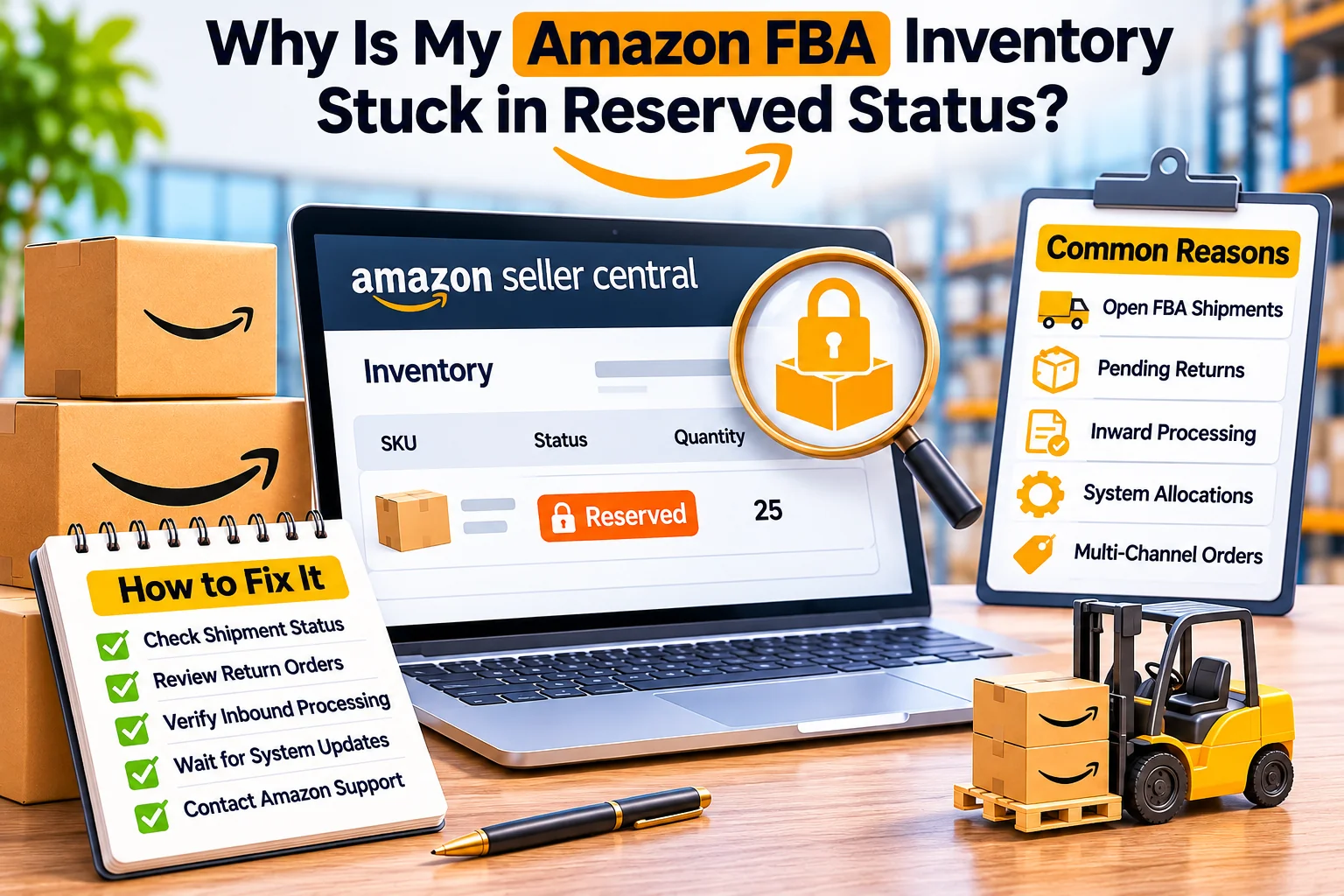
This raises an important question: Why is Amazon FBA inventory stuck in reserved status, and how can sellers make those units available for sale?
Amazon FBA inventory enters Reserved status when units are temporarily allocated to specific fulfillment activities or cannot immediately be treated as unrestricted sellable stock. Common reasons include customer orders, fulfillment center transfers, temporary staging, and fulfillment center processing.
Reserved inventory does not necessarily mean that Amazon has lost, damaged, or rejected the products. It often means that the units are moving through normal fulfillment operations or are waiting for a particular internal process to finish.
The problem becomes more serious when the reserved quantity represents most or all available inventory, especially for a newly launched product that depends on continuous stock availability.
For example, a private label seller may ship 500 units to Amazon FBA and discover that 450 units are reserved while only 50 are available. Another seller may see all 500 units classified as reserved immediately after shipment receipt.
Although the inventory totals appear similar, the underlying reasons can be completely different. One shipment might be moving between fulfillment centers, while another may be undergoing additional processing or associated with customer orders.
The correct response is not to submit repeated support requests without identifying the inventory category. It is to understand how Amazon classifies reserved stock, review the appropriate reports, and determine whether the delay is expected or requires investigation.
In this guide, we explain what Amazon FBA Reserved status means in 2026, the differences between FC transfer and FC processing, why newly received inventory may remain unavailable, and what sellers can do when reservation periods begin affecting sales.
We also examine inventory forecasting, fulfillment reporting, account health, and the operational steps that can reduce the commercial impact of unexpected FBA delays.
What Does Reserved Status Mean in Amazon FBA Inventory?
Amazon FBA uses different inventory classifications to show how units are being handled within its fulfillment network. A product may be available for immediate sale, inbound to a fulfillment center, reserved for an operational activity, or classified as unsellable.
Reserved status is one of these operational classifications. It means that the affected units have been assigned to a particular activity or are temporarily unavailable for unrestricted allocation.
Amazon’s official Reserved Inventory report explains that reserved units may be connected to customer orders or held at fulfillment centers for further processing. Amazon representatives also identify fulfillment center transfers as a common reason that inventory appears reserved.
These categories matter because reserved inventory is not always unavailable for purchase.
Certain units moving between fulfillment centers may remain purchasable even though Amazon cannot ship them immediately from their current location.
Other units, such as products undergoing specific fulfillment center processing, may not be available for new customer orders until the required activity is completed.
Sellers should therefore avoid treating every reserved unit as lost revenue or defective inventory.
The real question is why those units are reserved and how that particular status affects purchasing availability.
Reserved Inventory and Available Inventory Are Not the Same
Available inventory generally represents units Amazon can allocate to new customer orders under the applicable fulfillment conditions.
Reserved inventory represents units assigned to other fulfillment activities or awaiting an internal process.
For example, a customer may place an order for a product, causing Amazon to reserve one unit while the order is processed. That unit is no longer available for another customer order because it has already been allocated.
In another situation, Amazon may move a group of units between fulfillment centers to improve regional inventory distribution.
Those units can appear in a reserved category even when customers are still allowed to purchase them with an adjusted delivery estimate.
The distinction becomes important when interpreting inventory reports.
A seller with 300 reserved units and 100 available units does not necessarily have 400 units available for immediate shipment. However, it also should not assume that every reserved unit has been removed from customer purchasing eligibility.
The inventory category and applicable offer status must be reviewed together.
Why Newly Received FBA Inventory May Enter Reserved Status
Receiving inventory at an Amazon fulfillment center does not always mean that every unit is immediately ready to fulfill an order.
After a shipment arrives, Amazon may perform internal processes such as verifying units, checking product information, moving stock to another location, or preparing inventory for efficient distribution.
For sellers, the process can appear confusing because the shipment may show that units have been received while the available quantity remains low.
The physical arrival of products and their availability for customer orders are separate operational events.
For example, a shipment containing several cartons may be received at one fulfillment center, after which Amazon moves certain units elsewhere.
The seller sees that the products have entered Amazon’s network but may not see the full quantity become available immediately.
This can be a normal part of the fulfillment process rather than evidence of a shipment problem.
However, it is still important to verify that the received quantities match the shipment records and that no additional restrictions are affecting the ASIN.
Amazon Reserved Inventory Is Not Automatically Stranded Inventory
Reserved inventory and stranded inventory describe different conditions.
Reserved inventory is associated with fulfillment activities or temporary operational restrictions.
Stranded inventory refers to FBA inventory that cannot be purchased because it lacks an active, qualifying offer or faces another listing-related problem.
For example, a product may have inventory in an Amazon fulfillment center but be stranded because its listing is inactive or restricted.
A different product may have an active offer and units reserved for transfer between fulfillment centers.
The two situations require different actions.
A stranded inventory problem may involve repairing the product listing, correcting offer information, or addressing account restrictions.
An ordinary reserved inventory movement may resolve through Amazon’s fulfillment operations without the seller changing the listing.
Amazon’s FBA Inventory tool provides features for monitoring inventory condition and identifying stranded units.
Sellers should review both the inventory status and any listing-related alerts before deciding what to do.
Why Amazon FBA Inventory Gets Stuck in FC Transfer, FC Processing, or Customer Order Status
The most useful step in understanding reserved inventory is identifying the reservation reason.
Amazon’s reports and Seller Central guidance distinguish different operational categories, and these explain why units may not appear as immediately available.
Although the interface and available report fields can vary by marketplace, the key concepts remain customer-order allocation, fulfillment center movement, staging, and additional processing.
Customer Order Reservations
A customer-order reservation occurs when Amazon allocates inventory to fulfill an order.
For example, a customer buys three units of a product through Amazon FBA. Those units may appear reserved while Amazon processes the order and prepares the shipment.
This is a normal part of fulfillment.
Customer orders may also remain pending while payment verification or other order processing activities are completed.
Amazon’s US Reserved Inventory documentation states that payment verification can extend order processing by as long as 21 days.
During that period, the relevant units can remain reserved.
If payment is successfully processed and the order ships, the units are deducted from the inventory balance as part of normal fulfillment accounting.
If the order is canceled because payment cannot be verified, the units may return to available inventory.
A reservation associated with an actual customer order does not necessarily indicate a problem.
However, sellers should investigate unusual situations in which substantial inventory remains allocated to pending orders for an unexpectedly long period.
Fulfillment Center Transfer Reservations
FC transfer is one of the most commonly discussed reasons for reserved FBA inventory.
Amazon operates a distributed fulfillment network. Products may be moved between locations so inventory can be positioned closer to customers or allocated according to operational requirements.
For example, a shipment may initially arrive at one fulfillment center, but Amazon may decide to distribute some units to other facilities.
Those units can appear under FC transfer while they are being moved through the network.
Amazon representatives explain that units reserved for fulfillment center transfer can remain available for customer purchases.
However, when no immediately available units are located close enough to fulfill an order, customers may see a later shipping or delivery estimate.
This means FC transfer status should not automatically be interpreted as a complete sales restriction.
Amazon forum guidance has described transfers taking approximately 22 to 25 days in some circumstances, with other guidance referencing periods of up to 30 days.
These are contextual estimates rather than guaranteed processing deadlines.
Actual movement can vary according to location, operational demand, transportation conditions, and other factors.
When transfers remain unresolved for an unusually long period, a Seller Support investigation may be appropriate.
Fulfillment Center Processing Reservations
FC processing describes units set aside for additional processing at an Amazon fulfillment center.
According to Amazon’s official documentation, this may include verification of item dimensions and weight, pending investigations, or pending removal orders.
For example, Amazon may need to verify a product’s physical measurements before completing a particular inventory process.
Another product may be awaiting a review associated with a fulfillment or catalog issue.
These activities can temporarily prevent inventory from moving into unrestricted available stock.
Amazon representatives have described some FC processing situations lasting up to approximately 14 days, while also noting that certain cases can remain pending longer when unresolved issues exist.
That figure is not a universal deadline or guarantee.
A product that has been reserved for processing for several days may be moving through an ordinary workflow.
However, a seller should investigate whether there are outstanding compliance requests, listing-level issues, or support notifications if the processing period becomes unusually long.
FC processing should be evaluated using the available inventory records rather than assumptions about the cause.
Temporary Staging Reservations
Amazon’s current US Reserved Inventory report also identifies a staging category.
Staging refers to units temporarily held by Amazon to support fulfillment speed and operational allocation.
The official description states that sellers are not required to take action for ordinary staging reservations.
This category is important because older explanations of reserved inventory often focus only on customer orders, FC transfers, and FC processing.
Seller Central reporting terminology and available fields can change.
A seller reviewing current inventory data should rely on the categories actually displayed in the account.
For example, a temporary staging reserve may reflect an operational decision inside the fulfillment network rather than a product compliance problem.
Opening repeated cases or modifying product listings is unlikely to help when Amazon has identified the reservation as ordinary staging.
The appropriate response is generally to monitor the inventory and investigate only when additional evidence indicates an abnormal situation.
Why Reserved Inventory Can Move Between Categories
Inventory movement is not always a simple transition from Reserved to Available.
A unit may pass through different fulfillment activities as Amazon processes, transfers, or allocates it.
Amazon representatives have noted that units being prepared for transfer may temporarily appear in both FC processing and FC transfer-related records.
For example, Amazon may first process units at a receiving facility and then move them to another fulfillment center.
During the transition, the visible reserved category may change.
This does not necessarily indicate that the units have been reserved twice or that the seller’s inventory has disappeared.
The seller should review the relevant inventory movements and quantities to understand the sequence.
A sudden change in reservation category may be less concerning when the inventory ledger shows a corresponding legitimate operational movement.
The more important question is whether the total inventory can be reconciled and whether the products are progressing toward an expected fulfillment state.
How Long Does Amazon FBA Inventory Stay Reserved and When Should You Worry?
One of the most common seller questions is how long Amazon can hold inventory in Reserved status.
The answer depends on the reservation reason.
There is no single processing period that applies to every reserved unit, warehouse, product, or marketplace.
Customer-order allocations, internal transfers, and fulfillment center processing involve different workflows.
Some reservations may be resolved relatively quickly, while others take substantially longer.
The seller should compare the observed duration with the reason for the reservation and review whether Amazon has identified an outstanding action.
How Long Can Customer Orders Remain Reserved?
Customer-order reservations commonly last until the order is shipped or otherwise resolved.
Amazon’s US Reserved Inventory documentation explains that payment verification can extend processing by up to 21 days.
This is particularly relevant when sellers see inventory allocated to orders that have not yet shipped.
For example, a seller may have 20 units reserved against pending customer orders.
The units do not automatically return to available inventory simply because the seller expected them to ship the next day.
The underlying order must progress through the relevant process.
If the customer payment fails and the order is canceled, Amazon may release the allocated units.
A seller should not attempt to cancel legitimate customer allocations solely to increase the visible available quantity.
If the pending order behavior appears unusual, the relevant order information and Amazon support process should be reviewed.
How Long Can FC Transfers Take?
Amazon representatives have explained that FC transfers may take several weeks in certain situations.
Published forum guidance includes approximate periods of 22 to 25 days and examples of inventory remaining in transfer for up to around 30 days.
However, these values are not universal service-level guarantees.
Some units may move faster, while others may be delayed by operational or transportation circumstances.
For example, inventory moving between fulfillment centers during peak shopping demand may experience a different timeline from inventory moved during a quieter period.
The seller should monitor the transfer category and corresponding inventory movements.
If the units remain reserved for an extended period without an understandable movement history, contact Seller Support to request clarification.
Avoid promising customers that inventory will become available on a particular date unless Amazon provides a supported delivery estimate.
How Long Does FC Processing Take?
FC processing duration depends on the reason Amazon has set the units aside.
Amazon representatives have described a period of up to approximately 14 days for some processing situations, but exceptions exist.
Inventory awaiting ordinary verification may move into available stock without seller involvement.
Inventory associated with an unresolved investigation may require additional review.
For example, a product undergoing measurement verification may become available after the process is completed.
A different ASIN facing an unresolved listing-level issue may remain restricted for longer.
The seller should check whether Amazon has requested documents or identified any action required.
If no explanation is visible and processing continues beyond the expected period, a focused support case may be appropriate.
Why All Inventory Being Reserved Is More Serious
A small proportion of reserved units may be part of normal inventory operations.
However, the commercial impact can be much greater when every unit becomes reserved.
Amazon’s US Reserved Inventory guidance notes that a listing may temporarily stop appearing in search when all inventory is reserved and no units are available to fulfill new orders.
The exact impact depends on the reservation reason and whether transfer units remain eligible for purchase.
For example, a seller launching a new product may have no immediately available units after receiving a shipment.
This can delay the start of sales and affect planned advertising.
An established seller may experience a different problem: stock availability can fall while existing demand continues.
The seller should confirm whether the product detail page remains purchasable and whether Amazon displays a future delivery date.
A visible Reserved total alone does not fully explain the customer experience.
Does Reserved Inventory Mean Amazon Lost the Shipment?
No. Reserved inventory is not evidence by itself that a shipment is lost.
A unit can be physically within Amazon’s fulfillment network while its inventory classification reflects processing, staging, transfer, or customer allocation.
Lost inventory is a separate issue that may require investigation under Amazon’s applicable FBA policies.
For example, a shipment discrepancy involving fewer units received than expected should be investigated using shipment reconciliation and inventory movement records.
That is different from a shipment whose received units are accounted for but currently reserved.
Sellers should compare expected, received, available, reserved, unsellable, and relevant inbound quantities.
If a true discrepancy remains, follow Amazon’s appropriate investigation workflow.
Do not submit a lost-inventory reimbursement request solely because units are temporarily listed as reserved.
How Do You Check and Fix FBA Inventory Stuck in Reserved Status?
A useful troubleshooting process begins with identifying the affected SKU, the quantity reserved, and the specific reservation category.
Instead of assuming that the inventory is lost or blocked, sellers should work through the available Seller Central reports and identify whether the issue is operational, catalog-related, or connected to an order.
The correct action often depends on whether Amazon has requested seller involvement.
Review the FBA Inventory Dashboard
Start by signing in to the appropriate Seller Central marketplace.
Open the FBA inventory management tools and locate the affected SKU or ASIN.
Review the available quantity, reserved quantity, inbound units, and any other displayed classifications.
Record the information with the current date.
For example, a product might show 600 total units distributed across available, reserved, and inbound categories.
The purpose is to understand where the stock sits in Amazon’s fulfillment process.
Do not compare different reporting periods without checking when the data was generated.
If the listing has no available inventory, open the customer-facing product page to assess current purchasability.
Also check whether the product has any listing restrictions or offer-related problems.
This initial review helps establish whether the problem concerns inventory allocation alone or a wider account issue.
Download the Reserved Inventory Report
Amazon’s Reserved Inventory report provides information about units currently classified as reserved.
Where available in the relevant marketplace, locate the report through Seller Central’s fulfillment reporting tools.
The report can be downloaded in supported formats, including CSV or text, according to Amazon’s US documentation.
Identify the affected SKU and review its reserved quantity breakdown.
The report may distinguish customer-order reservations, staging, FC processing, and other categories available in the account.
This breakdown is one of the most important pieces of evidence when investigating reserved stock.
For example, 200 units reserved for customer orders require a different response from 200 units set aside for FC processing.
Do not contact support with only the total reserved quantity when more detailed category information is available.
Review the Inventory Ledger for Movement History
Amazon’s Inventory Ledger can help sellers understand relevant inventory events and movement history.
Amazon representatives recommend reviewing this report when units remain reserved or appear to be moving between fulfillment centers.
The ledger may provide information about transfers, receipts, adjustments, or other inventory events.
For example, a seller may discover that units previously held at one location are now associated with movement to another fulfillment center.
That information supports an interpretation of the reservation as a transfer process rather than an unexplained disappearance.
Compare the relevant dates and quantities carefully.
Inventory reports may use different terms or update at different times, so avoid assuming that every temporary difference represents a loss.
If the movement history remains unclear, include the relevant report information in the support request.
Check FBA Shipment Receiving and Reconciliation
When reserved status appears immediately after a new inbound shipment, verify that Amazon has received the expected number of units.
Open the shipment tracking workflow and compare the shipped and received quantities.
Amazon provides shipment tracking and discrepancy investigation procedures.
For example, a seller may have shipped 300 units, but the receiving record currently shows only 250.
This situation requires attention to the receiving and reconciliation process.
If Amazon has received all 300 units and classified 200 as reserved, the problem may instead concern internal processing or transfer.
These situations should not be confused.
A seller should also review any shipment action requirements and the applicable investigation eligibility dates.
Not every shipment can be investigated immediately after delivery.
Look for Account Health and Compliance Restrictions
Some inventory problems occur alongside listing or compliance issues.
For example, a product may be undergoing an investigation, or Amazon may have requested documents related to its category.
The Reserved status alone does not establish that such a restriction exists.
Check Account Health, relevant product compliance notifications, and listing status for any actual warning.
If Amazon requests safety documentation, submit the relevant genuine evidence.
If the product is restricted because of a policy issue, resolve the identified problem through the correct process.
Changing keywords or uploading new product images will not necessarily release inventory reserved for an unrelated operational review.
The seller should focus on the specific action Amazon requests rather than making speculative catalog changes.
Determine Whether Seller Action Is Actually Required
Some reservation categories are handled automatically by Amazon.
For ordinary staging, Amazon’s official documentation states that seller action is not required.
For FC processing, Amazon indicates that it will notify sellers if action is needed.
For FC transfers, the seller normally cannot directly control Amazon’s internal distribution decisions.
This means an effective troubleshooting process should also identify when waiting for an internal process to finish is the appropriate action.
For example, repeatedly opening cases about ordinary staging may not accelerate fulfillment.
However, an unexplained extended reservation can justify requesting a review.
The decision should depend on the category, duration, supporting inventory records, and whether the customer-facing offer is affected.
Contact Seller Support With a Focused Inventory Case
When units remain reserved unexpectedly, Seller Support may be able to investigate the relevant inventory status.
Prepare the affected marketplace, ASIN, SKU, FNSKU where applicable, shipment ID, reserved quantity, category, and date the issue began.
Include relevant information from the Reserved Inventory report or Inventory Ledger.
Describe the commercial impact accurately.
For example, a seller might explain that all received inventory has remained in FC processing, no available units are shown, and the product cannot currently receive new orders.
Ask Amazon to confirm the reason for the reservation and whether additional action is required.
Avoid demanding a guaranteed release date when the cause is unknown.
A clear case history makes it easier to follow the issue through the appropriate support channels.
Why You Should Not Delete or Recreate the Listing
Deleting a listing is not a general solution to FBA Reserved inventory.
The units may still be physically held or moving within Amazon’s fulfillment network.
Removing the listing can also create additional complications when the inventory needs an eligible offer to remain purchasable.
Amazon’s US documentation advises sellers not to close or delete a listing merely because all units are reserved and available inventory is temporarily zero.
Instead, investigate the reservation breakdown and allow the normal process to resolve where appropriate.
If Amazon identifies a separate listing restriction, follow its specific instructions.
Changes to ASIN identity, SKU structure, or listing status should not be made casually while existing FBA inventory is being processed.
How Can Sellers Reduce the Sales Impact of Amazon Reserved Inventory?
Sellers cannot control every internal Amazon fulfillment movement, but they can improve how their businesses respond to inventory uncertainty.
The most effective approach connects replenishment planning, shipment tracking, product availability, advertising decisions, and cash flow.
A reserved inventory problem becomes significantly more disruptive when the seller has no safety stock, no realistic replenishment plan, or no visibility into inventory movements.
Maintain Practical Safety Stock
Safety stock provides a buffer against unexpected demand and supply delays.
For Amazon FBA sellers, replenishment planning should consider manufacturing time, freight transit, inbound receiving, and any relevant internal availability delays.
For example, a product selling 10 units per day with a total replenishment lead time of 35 days would require approximately 350 units to cover expected demand during that period.
Additional safety stock may be appropriate depending on demand variability and supply uncertainty.
However, keeping excessive inventory also creates costs.
The objective is to balance stockout risk against storage charges and working capital.
For newly launched products, estimates should be conservative because actual sales velocity may not yet be established.
Use Inventory Forecasting Instead of Reactive Ordering
Inventory planning should account for the time required for new stock to become sellable.
A shipment arriving at Amazon is not necessarily the same as inventory becoming fully available.
For that reason, sellers should review historical processing and transfer experiences when calculating replenishment lead times.
A simplified planning model is:
Reorder Point = Average Daily Sales × Total Replenishment Lead Time + Safety Stock.
For example, a seller averaging eight units per day with a 40-day replenishment lead time and 80 units of safety stock would have an illustrative reorder point of 400 units.
The calculation should be adjusted for seasonal demand, supplier reliability, freight uncertainty, and existing inbound stock.
A useful forecast distinguishes inventory already available from inventory that is still reserved or inbound.
Coordinate FBA Shipments With Warehouse Planning
Some businesses benefit from keeping part of their inventory outside FBA until replenishment is required.
Depending on the marketplace and operational model, sellers may use third-party logistics providers or eligible Amazon warehousing services.
For example, a private label brand might hold additional cartons in an external warehouse and send smaller replenishment shipments to FBA.
This can improve flexibility when demand is uncertain.
However, smaller shipments may also create additional inbound costs and operational complexity.
The correct approach depends on the product’s selling price, storage requirements, shipping economics, and inventory turnover.
Professional Amazon inventory and warehousing support can help sellers evaluate appropriate fulfillment arrangements.
Monitor Inventory Before Increasing Advertising Spend
Advertising campaigns should be coordinated with available inventory.
A seller may have a well-optimized listing and strong PPC results, but an unexpected reservation can reduce the stock available for immediate fulfillment.
Before increasing advertising budgets, check the current offer availability and expected inventory coverage.
For example, a business preparing a promotion should verify that sufficient stock is ready to support additional orders.
If the listing is temporarily unavailable for purchase, advertising eligibility and campaign performance may be affected.
The seller should investigate the actual campaign and inventory conditions rather than assume every decline in impressions is an advertising issue.
The objective is to avoid spending promotional resources when the business cannot reliably fulfill expected demand.
Review Product-Level Profitability During Inventory Delays
Reserved inventory can create financial pressure even when the products are not lost.
Inventory capital may remain committed while sales are delayed.
The seller may also incur warehouse, freight, financing, or other operating expenses.
For example, a product launch originally scheduled for one week may be postponed because most of its stock remains in processing.
That delay can affect cash flow and the timing of future supplier payments.
However, sellers should not assume that every reserved unit generates a special reservation fee.
Actual Amazon charges depend on the applicable fee policies and inventory conditions.
Review relevant storage costs, advertising expenditure, and available cash before committing to additional inventory.
A profitable business requires more than accurate stock quantities; it requires visibility into the financial impact of operational delays.
Review Inventory Trends Across Multiple ASINs
For brands managing many products, reserved inventory should be tracked as part of normal account reporting.
A useful report can identify total FBA stock, available units, reserved units, reservation reason, inventory age, and replenishment status for each important SKU.
For example, a seller with twenty products may discover that two ASINs repeatedly experience long processing delays after inbound shipments.
That pattern may justify closer examination of product preparation, shipment configuration, or other relevant operational factors.
However, correlation does not prove that the seller’s preparation caused the delays.
The objective is to identify recurring issues and investigate them with evidence.
A coordinated account management process helps businesses prioritize the inventory problems with the greatest commercial impact.
Prepare for Seasonal and Marketplace-Specific Delays
Inventory handling patterns can change during periods of high demand, major promotions, or operational disruptions.
A business planning seasonal sales should allow appropriate time for manufacturing, freight, customs clearance, and fulfillment processing.
The correct lead time depends on the marketplace, product, and logistics arrangement.
For example, an international seller shipping goods to Amazon USA may experience different inbound and transfer conditions from a seller supplying Amazon UAE.
Do not apply one marketplace’s observed timelines as guaranteed rules for every country.
Review the local Seller Central documentation and actual shipment history.
When planning important promotions, avoid assuming that inventory will be immediately available as soon as the carrier reports delivery.
How Can iNNOVEX Enterprises Help With Amazon FBA Inventory Management?
Reserved inventory becomes easier to manage when sellers have reliable reporting, realistic replenishment forecasts, and a clear understanding of Amazon’s fulfillment workflows.
The challenge is often not simply identifying the Reserved quantity. It is connecting that information with shipment receiving, sales demand, available stock, advertising activity, and future purchasing decisions.
At iNNOVEX Enterprises, an Amazon SPN agency, we support businesses with Amazon FBA setup, inventory management, fulfillment coordination, account operations, and international eCommerce services.
Our support is designed to help sellers monitor marketplace operations and identify issues that require attention.
For a business experiencing unusual reserved inventory, the first priority is to review the relevant Seller Central information and determine whether the affected units are allocated to customer orders, staging, transfer, or processing.
This distinction helps avoid unnecessary actions and directs attention toward the appropriate resolution workflow.
Amazon FBA Inventory and Shipment Support
We support sellers with relevant FBA inventory planning and shipment coordination.
This can include reviewing inbound shipment details, understanding received quantities, monitoring inventory availability, and coordinating appropriate follow-up.
For international sellers, inventory planning may also involve freight, customs, warehousing, and supplier communication.
The goal is to provide a more organized view of the supply chain before and after inventory reaches Amazon.
Amazon Inventory Forecasting and Warehousing
We help businesses evaluate inventory requirements, replenishment timing, and relevant storage options.
For products with consistent demand, practical forecasting can reduce the risk of running out of sellable inventory while replacement stock is being processed.
However, all forecasts involve uncertainty.
Appropriate inventory quantities depend on customer demand, supplier lead times, working capital, and actual operational performance.
Amazon Account Management and Operational Monitoring
Our Amazon account management services support ongoing marketplace activities, including catalog reviews, inventory coordination, and relevant Seller Central troubleshooting.
When stock availability changes unexpectedly, a structured reporting process can help identify the affected SKUs and the severity of the issue.
For example, a product with no available inventory may require higher priority than a product with a small percentage of units reserved for customer orders.
This approach allows operational attention to be directed toward problems that affect business continuity.
Amazon PPC and Inventory Coordination
Advertising performance is connected to product availability.
We support campaign management and performance analysis while considering relevant inventory conditions.
For example, a business planning a new product launch should verify that the product is purchasable and that sufficient units are available before committing to a significant advertising push.
A coordinated approach helps reduce avoidable conflicts between marketing plans and fulfillment readiness.
Actual advertising results remain dependent on product competitiveness, demand, and other marketplace factors.
Frequently Asked Questions About Amazon FBA Reserved Inventory
Why is my Amazon FBA inventory stuck in Reserved status?
Amazon may reserve units for customer orders, fulfillment center transfers, temporary staging, or additional fulfillment center processing. The correct explanation depends on the reservation category shown in the relevant Seller Central reports.
How long does Amazon FBA inventory stay reserved?
There is no universal reservation period. Amazon’s guidance describes customer payment verification extending up to 21 days, while certain FC transfers may take several weeks. FC processing duration depends on the underlying reason.
What does FC transfer mean in Amazon FBA?
FC transfer generally refers to inventory moving between Amazon fulfillment centers. Amazon representatives explain that transfer units can remain available for purchase, although customers may sometimes see a later delivery estimate.
What does FC processing mean in Seller Central?
FC processing indicates that inventory has been set aside for additional fulfillment center activities, such as verification of dimensions or weight, investigations, or pending removal orders.
Can customers buy reserved Amazon FBA inventory?
Some reserved units, particularly those undergoing fulfillment center transfers, may remain purchasable. Other reservations may prevent the units from being allocated to new customer orders.
Why is my Amazon FBA available inventory showing zero?
All units may currently be reserved, inbound, or otherwise unavailable. Review the detailed inventory breakdown and confirm whether the customer-facing offer remains purchasable.
Does Reserved status mean my Amazon inventory is lost?
No. Reserved status does not automatically indicate lost inventory. It generally reflects an operational allocation or processing category. A suspected inventory discrepancy requires separate investigation.
How do I check why my FBA stock is reserved?
Review the relevant FBA Inventory dashboard, Reserved Inventory report, and Inventory Ledger. These tools can provide information about the quantities and reservation reasons.
Should I delete my listing if all FBA units are reserved?
No. Amazon’s US guidance advises against closing or deleting a listing merely because all units are temporarily reserved. First investigate the reservation reason and any actual listing restrictions.
When should I contact Amazon Seller Support about reserved inventory?
Contact Seller Support when inventory remains reserved unexpectedly, the available reports do not explain the situation, or the issue requires investigation. Provide the ASIN, SKU, shipment information, reservation category, dates, and affected quantities.
Conclusion: Understand the Reservation Reason Before Taking Action
Amazon FBA Reserved status is not necessarily a warning that inventory has been lost or rejected. It is often a normal classification associated with customer orders, fulfillment center transfers, staging, or processing.
The difficulty arises when sellers cannot distinguish an expected operational movement from a delay that requires investigation.
The most useful first step is to review the reserved inventory breakdown and identify which category applies to the affected units.
Customer-order reservations should be evaluated alongside order processing. FC transfers should be reviewed through relevant inventory movement records. FC processing should be checked for operational investigations or notifications requiring seller action.
If the inventory remains reserved for an unusually long period, or if the reports do not explain the delay, Seller Support can be contacted with the relevant evidence.
Sellers should avoid deleting listings, creating unnecessary replacement SKUs, or assuming that every reserved unit is unavailable for customer purchase.
Beyond immediate troubleshooting, the wider business priority is to maintain a replenishment process that accounts for realistic fulfillment lead times, available inventory, seasonal demand, and working capital.
A coordinated approach to FBA shipments, warehousing, account management, and advertising can reduce the commercial disruption caused by unexpected inventory delays.
As an Amazon SPN agency, iNNOVEX Enterprises supports sellers across UAE, USA, UK, Saudi Arabia, and other marketplaces with FBA setup, inventory planning, logistics coordination, catalog management, and ongoing marketplace support.
If your Amazon FBA inventory remains reserved and you cannot identify the reason, begin by reviewing your Reserved Inventory report, shipment records, and inventory movement history.
For professional Amazon FBA and inventory management assistance, visit iNNOVEX Enterprises and discuss your fulfillment requirements with our team.