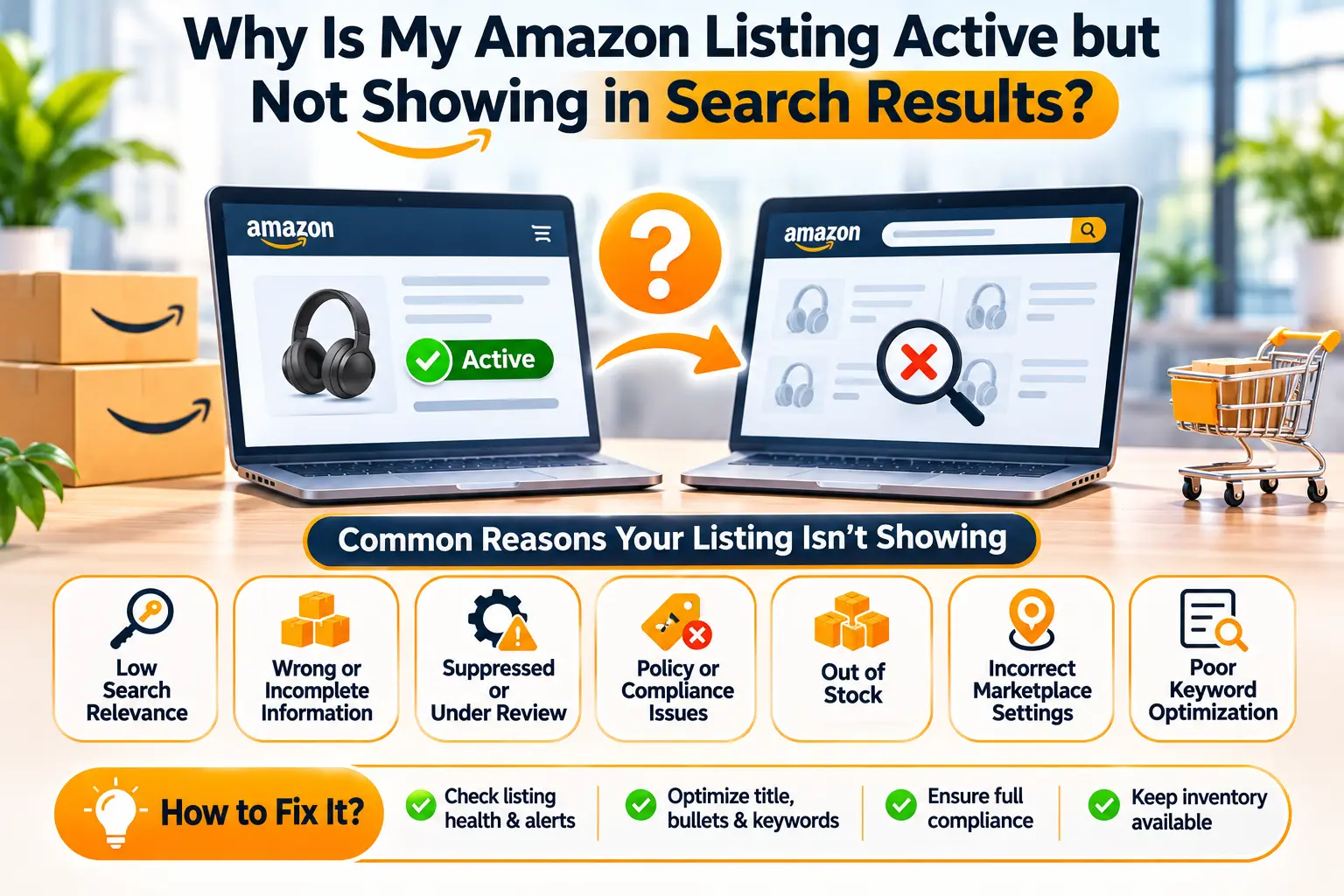
Imagine creating a product listing on Amazon, uploading professional images, setting a competitive price, and adding available inventory. Seller Central shows the product status as Active, but when you search for the item on Amazon, it is nowhere to be found.
You try searching for the exact product title, the brand name, and important keywords, but the listing still does not appear.
This is a common and frustrating problem for Amazon sellers because an active product may be ready for purchase without receiving the search visibility the seller expects.
So, why is your Amazon listing active but not showing in search results?
An Amazon listing may show as Active in Seller Central but remain missing from search results because of search suppression, incomplete product attributes, catalog classification problems, search indexing delays, offer availability, or weak keyword relevance.
In some situations, the product is genuinely not searchable. In others, it is searchable but ranks too low for the seller to find it easily.
Understanding this distinction is essential because different problems require different solutions.
For example, an ASIN that Amazon has suppressed from search will not necessarily become discoverable simply by adding more keywords.
Likewise, a perfectly valid listing may appear far down the results for a highly competitive search term, even when no technical problem exists.
Amazon’s official Seller Central guidance recognizes that listing-quality problems can prevent products from appearing in search and browse results.
The platform also provides tools that help sellers identify why an ASIN is not searchable.
For businesses operating on Amazon USA, UAE, UK, Saudi Arabia, and other marketplaces, search visibility is an important part of product performance.
Without relevant customer exposure, a product may struggle to generate clicks, sales, and advertising results.
In this guide, we explain the main reasons Amazon listings remain invisible despite an Active status, how to investigate listing suppression and indexing problems, and which steps can help restore or improve product visibility in 2026.
1. Why Is an Amazon Listing Active but Not Showing in Search Results?
An Active status means that a seller’s listing or offer meets certain conditions for being listed, but it does not guarantee that the ASIN will appear in every Amazon search result.
Amazon maintains different systems for managing product catalog information, selling offers, search visibility, product compliance, and customer discovery.
A product may pass one set of checks while facing issues in another.
This explains why sellers sometimes see an active SKU in their inventory dashboard even when customers cannot easily discover its product page.
The correct diagnosis begins by understanding what each status actually means.
What Does Active Mean in Amazon Seller Central?
An Active status generally indicates that a seller’s offer is listed as active within the relevant inventory management system.
However, the exact meaning depends on the page, marketplace, and account conditions.
An active offer does not automatically prove that the product detail page is fully searchable for every relevant keyword.
Sellers should confirm additional factors, including the correct marketplace, offer availability, price, inventory, category, and search suppression status.
For example, a product may have an active SKU but contain missing catalog information that prevents normal search visibility.
Another product may be active but appear beyond the number of search results Amazon displays for a particular query.
These are different situations that require separate investigation.
What Is Amazon Search Suppression?
Amazon search suppression occurs when the platform prevents a product from appearing in normal search or browse results because the listing does not meet certain requirements.
Amazon’s official documentation explains that listing-quality issues can result in an ASIN being search suppressed or removed from its detail page.
Possible causes include missing required information, inappropriate titles, inadequate images, or other catalog problems.
Some issues may be visible through Seller Central’s listing management tools.
For example, Amazon provides a Search Suppressed filter that can help sellers identify affected listings.
A search-suppressed product should be investigated before spending money on campaigns intended to increase its visibility.
Search suppression is a catalog or eligibility problem, not simply a low organic ranking position.
What Is Amazon Search Indexing?
Search indexing refers to how product information becomes available for matching relevant shopping searches.
Customers may search using product names, brands, features, materials, or other terms.
Amazon uses information from product listings and other systems to determine relevant results.
However, sellers should not assume that every word included in a listing will be matched to every search.
A new ASIN or recently updated product may also require time for catalog and search information to be processed.
Amazon’s official searchability guidance notes that some changes can take time to become reflected in search.
If a listing was updated recently, an immediate search may not fully reflect the changes.
However, persistent problems should be investigated rather than attributed indefinitely to indexing delays.
What Is the Difference Between an Unsearchable and Low-Ranking ASIN?
An unsearchable ASIN may be prevented from appearing in search because of catalog, quality, or other eligibility problems.
A low-ranking ASIN can still appear in search, but its position may be far below competing products.
For example, a seller might search for “wireless digital microscope” and fail to find the product on the first five pages.
That observation alone does not prove that the ASIN is suppressed.
The product may be ranked much lower for that broad term or may be displayed differently depending on the shopping context.
By contrast, a product flagged as Search Suppressed has a specific issue that should be resolved.
Amazon also limits how many results are displayed for certain searches, so failure to appear in a manually inspected set of pages is not conclusive evidence of deindexing.
Why Does My Amazon Product Page Open Through Its ASIN but Not Appear in Search?
A product detail page may sometimes be accessible through its direct URL even when the product is not visible for expected searches.
This can happen because the page exists in Amazon’s catalog while search visibility is limited, delayed, or affected by another issue.
The ability to open a product URL does not independently confirm successful keyword indexing.
Similarly, a functioning detail page does not rule out search suppression.
Sellers should review the listing status and use Amazon’s searchability diagnostic resources.
The direct URL can help confirm that the detail page exists, but additional checks are required to determine why relevant searches do not display the item.
Does an Active Listing Guarantee Amazon Sales or Impressions?
No. An active listing does not guarantee impressions, clicks, or purchases.
Search exposure depends on whether customers use relevant queries, whether the product is eligible to appear, and how it performs within Amazon’s shopping environment.
A highly specialized product may receive little traffic simply because demand is limited.
Another product may face intense competition from established alternatives.
Sellers must separate technical searchability from marketing performance.
Before optimizing campaigns or rewriting content, establish whether the product is actually eligible to appear in search results.
2. What Are the 12 Most Common Reasons Amazon Listings Do Not Appear in Search?
Several technical and commercial problems can explain why Amazon listings remain difficult to find.
Some involve catalog restrictions, while others relate to keyword relevance or the shopping offer.
The following twelve causes provide a practical troubleshooting framework.
Reason 1: Your Amazon Listing Is Search Suppressed
Search suppression is one of the first issues sellers should check when an active product cannot be found.
Amazon may suppress a listing when required information is missing or does not meet the platform’s quality standards.
For example, a product may lack an acceptable main image or a required product attribute.
A title that violates applicable requirements may also create problems.
Amazon’s official seller education directs sellers to locate the Search Suppressed and Inactive Listings tools when investigating affected products.
Open the relevant listing management page and review any errors associated with the ASIN.
Correct the actual problem instead of making unrelated edits.
For example, if Amazon identifies a missing attribute, complete that attribute accurately.
Adding more search keywords will not necessarily resolve missing mandatory product information.
Reason 2: Your Product Is Missing Required Attributes
Amazon uses structured product attributes to describe and classify items.
Important fields may include product type, brand, material, size, color, dimensions, compatibility, quantity, and other category-specific information.
Some attributes are mandatory for particular products.
If required fields are empty or incorrect, the listing may encounter quality problems or restrictions.
For example, a toy listing may require relevant age or safety information.
An electronic item may require specific battery or power-related details.
The required fields depend on the category and marketplace.
Review the product’s edit page and any incomplete listing warnings.
Do not enter false information simply to satisfy a required field.
Confirm uncertain specifications with the manufacturer or appropriate product documentation.
Reason 3: Your Product Title Violates Amazon’s Requirements
Product titles should accurately identify the item and comply with Amazon’s marketplace and category rules.
Amazon has updated title requirements over time, including rules addressing certain special characters and excessive repetition.
A title may become problematic when it contains prohibited characters, irrelevant promotional statements, or other noncompliant content.
For example, a seller might repeat the same keyword multiple times in an attempt to increase rankings.
This approach can reduce readability and create listing-quality concerns.
Review the current title requirements for your product category.
Use a clear structure that identifies the product and important characteristics without unnecessary repetition.
If Amazon has flagged a title issue, correct the actual violation.
Reason 4: Your Main Image Is Missing or Noncompliant
The main product image is a key part of Amazon product presentation.
If the image is missing, invalid, or inconsistent with applicable rules, the listing may face restrictions.
Main-image policies can depend on the category, but Amazon generally requires accurate product presentation and a suitable white-background image for many standard product categories.
Unnecessary promotional text, watermarks, unrelated objects, or misleading product representations may cause problems.
For example, a seller offering a two-pack of adhesive hooks should not use a main image that incorrectly represents a different quantity.
The image should show the actual item customers will receive.
Review image warnings in Seller Central and confirm that the final images meet the correct marketplace requirements.
Reason 5: Your Product Has an Incorrect Category or Browse Classification
Amazon organizes products through categories and product types.
Incorrect classification can affect how a product is presented and how customers discover it.
For example, an educational toy incorrectly classified in an unrelated household category may not appear as expected in relevant browsing experiences.
Product type selection also influences which catalog attributes are required.
Check the category and product type associated with your ASIN.
Compare them against the actual product rather than choosing a category based only on expected traffic.
If a catalog classification cannot be corrected through the normal interface, contact Seller Support with appropriate supporting information.
Avoid creating duplicate listings merely to bypass a category problem.
Reason 6: Your Listing Has a Brand Name or Catalog Conflict
Amazon maintains rules governing brand names, product identifiers, and catalog contributions.
A seller may encounter problems when brand information does not match the approved brand or actual product.
For example, a private label seller might enter a different brand spelling from the one shown on the packaging.
Some brand authorization issues are identified during listing creation through specific error codes.
Other catalog conflicts may require Seller Support investigation.
Verify that your brand name, product identity, and supporting documentation are accurate.
Do not classify a genuinely branded product as Generic simply to bypass brand approval.
Amazon’s Generic product rules impose separate requirements.
Reason 7: Your Product Is Restricted or Has a Compliance Issue
Certain products are subject to additional selling restrictions and regulatory requirements.
Amazon may require documents relating to safety, product authenticity, batteries, labeling, or category eligibility.
For example, an electronic toy containing a rechargeable battery may require different documentation from an ordinary non-electronic household item.
A listing can encounter restrictions if Amazon requests compliance evidence that has not been supplied.
Check the relevant compliance notifications and account health information.
Review the specific reason shown by Amazon.
Submit genuine, accurate documentation that supports the product’s actual specifications.
Do not create misleading certificates or modify product information to conceal regulated components.
Reason 8: Your Offer Is Not Purchasable in the Selected Marketplace
A product may exist in Amazon’s catalog without having a purchasable offer that meets the intended marketplace conditions.
Check whether the offer has an appropriate price, available quantity, and correct selling settings.
Also review any offering release dates or other applicable availability settings.
A product with zero sellable inventory may not be presented in the same way as an available item.
The account may also be registered for a different marketplace from the one being searched.
For example, an active Amazon.ae listing does not automatically mean that the product is available on Amazon.com.
Always confirm the correct marketplace before diagnosing search visibility.
Reason 9: Your FBA Inventory Is Not Yet Available for Sale
FBA inventory moves through different operational stages.
Products may be inbound, receiving, reserved, available, or otherwise classified according to Amazon’s fulfillment systems.
An inbound shipment that has reached a warehouse does not automatically mean every unit is immediately sellable.
A seller may see inventory movement in Seller Central while the offer still lacks available quantity.
Check the SKU’s sellable inventory and shipment status.
Differentiate physical receipt from inventory availability.
If the stock remains unavailable unexpectedly, investigate through the appropriate FBA inventory support process.
Do not assume that every inventory delay is a keyword indexing problem.
Reason 10: Your Product Was Recently Created or Updated
New ASINs and recent catalog edits may require processing before every change becomes visible in search.
Amazon’s searchability guidance explains that updates can take up to 72 hours in some circumstances.
However, this is not a guaranteed timetable for every listing issue or marketplace.
For example, changing a product title may be reflected on the detail page before every relevant search experience updates.
If the change was made recently, record the submission time and check whether Amazon accepted the contribution.
Avoid repeatedly editing the same fields without understanding the issue.
If the listing remains unsearchable after a reasonable period, use the official diagnostic tool or contact Seller Support.
Reason 11: Your Keywords Do Not Match Customer Search Intent
A listing may be technically searchable but have weak relevance for the terms the seller expects to rank for.
For example, a product selling suction cup razor holders may not rank prominently for a broad search such as “bathroom storage.”
Customers entering that phrase may want shelves, cabinets, organizers, and many other items.
More specific searches may match the product more accurately.
Keyword research should identify what the item actually is and how customers describe it.
Use relevant terms naturally in the title, bullets, descriptions, attributes, and available backend fields.
Avoid unnecessary repetition or unrelated high-volume keywords.
Poor keyword relevance should be treated as an SEO challenge, not automatically as technical suppression.
Reason 12: Your Product Ranks Too Low to Be Easily Found
Sometimes the listing is neither restricted nor suppressed.
It simply has limited visibility for the chosen search term.
This can happen in competitive categories where customers have many alternatives.
A new product may also have limited sales history, customer feedback, or established market presence.
Amazon does not disclose a complete formula guaranteeing organic ranking positions.
Sellers should evaluate listing relevance, product differentiation, pricing, delivery, customer experience, and performance data.
Do not assume that increasing PPC spending guarantees higher organic placement.
Organic visibility and sponsored placements should be measured separately.
3. How Do You Check Whether Your Amazon ASIN Is Searchable?
Before rewriting an entire listing, complete a structured diagnostic process.
The goal is to confirm the actual issue using Seller Central information and observable customer-facing behavior.
Step 1: Open Manage All Inventory
Sign in to the Seller Central account associated with the product.
Select the correct marketplace and open Manage All Inventory or the current equivalent inventory management page.
Search for the relevant ASIN or SKU.
Verify that the product appears under the expected seller account.
Check the listing status and any warnings displayed.
Record the ASIN, SKU, product title, and marketplace before proceeding.
These details will also be useful if Seller Support assistance becomes necessary.
Step 2: Check Search Suppressed and Inactive Listings
Amazon’s official listing error guidance directs sellers to a Search Suppressed and Inactive Listings area within its relevant listing management workflows.
The precise navigation may vary as Amazon updates Seller Central.
Look for Search Suppressed, At Risk of Search Suppression, or equivalent status filters.
If the listing appears in these areas, review the reason and required action.
For example, Amazon may identify missing product information or an unacceptable image.
Correct the relevant issue and confirm that the updated information has been submitted.
Do not rely solely on the general Active status shown elsewhere.
Step 3: Use Amazon’s ASIN Is Unsearchable Tool
Amazon provides a dedicated diagnostic resource for sellers investigating why an ASIN does not appear in search.
Search Seller Central Help for “ASIN is unsearchable”.
The tool is associated with Amazon’s guidance on determining why an ASIN is not searchable.
Follow the instructions shown for the affected marketplace.
You may be asked to provide the ASIN and a relevant search results URL.
This diagnostic process can help distinguish certain technical issues from search behavior.
Because Seller Central tools may require authentication, use the official Help interface rather than relying on unrelated third-party websites.
Step 4: Open the Product Detail Page Directly
Where appropriate, open the product’s detail page using the marketplace and ASIN.
For example, a US product may have a customer-facing URL in the format:
https://www.amazon.com/dp/YOUR-ASIN
Replace the placeholder with the actual ASIN.
Check whether the page loads normally.
Confirm that the correct product information appears.
Review the title, images, price, stock availability, and purchasing options.
A working detail page provides useful information, but it does not prove that every search query will display the item.
If the page fails to load, capture the exact error for troubleshooting.
Step 5: Verify the Offer Is Available for Purchase
Review the available inventory associated with the offer.
Check whether the product has an active selling price and appropriate availability settings.
Confirm that the offer is intended for the correct marketplace.
For FBA products, distinguish inbound inventory from units available for sale.
If another seller is associated with the same ASIN, review the applicable offer information.
A missing Featured Offer does not automatically prove that the ASIN is unindexed, but offer eligibility may affect customer purchasing opportunities.
Step 6: Search for the Exact ASIN
You can use the product’s exact ASIN as one additional observation when investigating searchability.
However, Amazon’s search systems may interpret different query types differently.
A product’s appearance or absence in an ASIN search should not be treated as the only diagnostic result.
If Amazon returns no product, compare the outcome with Seller Central’s searchability tool and the direct detail page.
Record the observed result and the marketplace where the search occurred.
Do not declare the listing permanently unindexed based solely on one manual search.
Step 7: Test Relevant Product Keywords
Search for a small set of terms that accurately describe the product.
Begin with specific phrases and then evaluate broader category terms.
For example, a two-pack suction razor holder might be associated with searches such as “suction razor holder” and “shower razor holder.”
Use only terms that match the actual item.
Do not rely exclusively on the exact title because Amazon may interpret search queries and result relevance differently.
Document which searches produce the product and which do not.
This helps distinguish broad keyword competition from a more general searchability problem.
Step 8: Check Product Category and Attributes
Open the product editing workflow and review its classification.
Confirm that the category and product type accurately describe the item.
Check mandatory and important attributes.
For example, if the product is a rechargeable electronic accessory, verify that relevant power and battery fields are completed accurately.
If you discover an incorrect category or missing required information, correct it through the supported process.
Some catalog fields may be controlled by Amazon or other authorized contributors.
If an update is rejected, preserve the error message and investigate through Seller Support.
Step 9: Review Account Health and Compliance Notifications
Search visibility issues may be associated with broader selling restrictions.
Check Account Health and relevant compliance dashboards for notifications.
Look for documentation requests, selling restrictions, intellectual property concerns, or category eligibility problems.
Read the exact reason Amazon provides.
If the restriction concerns product authenticity, safety, or another regulated matter, use the appropriate appeal or documentation workflow.
SEO edits cannot replace required compliance evidence.
Step 10: Analyze Search Performance Data
If the listing is confirmed searchable, evaluate whether it receives customer impressions.
Eligible brand owners can use Amazon Brand Analytics, including Search Query Performance and Search Catalog Performance.
These reports can provide information about search impressions, clicks, cart additions, and purchases.
Review the available reporting period and selected marketplace.
A lack of impressions may indicate limited exposure or demand, but it does not independently prove search suppression.
Compare the results with listing eligibility, customer demand, and keyword relevance before reaching a conclusion.
Step 11: Contact Amazon Seller Support When Necessary
If the listing remains unsearchable despite completing the relevant checks, open a support case through Seller Central.
Provide the exact ASIN, SKU, marketplace, and description of the problem.
Explain whether the product is active, whether its direct detail page loads, and whether Amazon’s diagnostic tool identified an issue.
Include relevant error messages and supporting screenshots where appropriate.
Avoid submitting multiple unrelated requests that describe the same issue differently.
Clear, consistent evidence can help the support team understand the problem.
4. How Can You Fix an Amazon Listing That Is Active but Missing From Search?
Once the cause has been identified, the corrective action should address that specific problem.
Different symptoms require different fixes.
The following examples illustrate practical troubleshooting approaches.
Fix Search Suppressed Listings
If Amazon explicitly identifies the product as Search Suppressed, prioritize the issues shown in the relevant Seller Central tool.
These may involve listing quality, missing information, or policy requirements.
For example, if the product is missing an acceptable main image, upload an accurate image that meets the applicable rules.
If a required attribute is incomplete, provide the correct information.
After submitting the changes, verify whether Amazon accepts them.
Continue monitoring the status until the suppression issue is resolved or further action is requested.
Do not assume that editing unrelated fields will automatically remove suppression.
Correct Missing Product Attributes
Review the required fields for the ASIN’s product type.
Complete accurate material, dimensions, color, quantity, compatibility, and other applicable specifications.
Some fields may be important for category navigation even when they are not visibly emphasized in the product title.
For example, a board game listing may require attributes that differ from those for a kitchen accessory.
Use reliable manufacturer information rather than guessing.
If the listing belongs to a shared catalog detail page, some contributions may need additional authorization or review.
Optimize the Product Title
A product title should clearly identify the item.
Include relevant product information such as type, size, quantity, material, or compatibility where appropriate.
Follow Amazon’s current category-specific title policy.
For example, a product title should not include repeated promotional terms simply to attract more searches.
Avoid unnecessary special characters and misleading descriptions.
If the title is already accurate and compliant, do not rewrite it merely because the product has limited organic visibility.
Investigate the wider offer and customer demand first.
Repair Main Image Problems
If Amazon identifies an image violation, replace the problematic file with a compliant version.
For many standard product categories, the main image should show the actual product against a white background.
The image must accurately represent what customers receive.
For a product sold as a two-pack, the displayed quantity should be consistent with the actual listing.
Do not add unrelated props or digitally alter the product’s shape.
Review image clarity and ensure that the required resolution and composition rules are satisfied.
Additional lifestyle and infographic images should also remain truthful.
Correct Category and Browse Classification
If the product has been classified incorrectly, identify the appropriate category and product type.
Use Amazon’s listing editing tools or relevant catalog correction process.
For example, a phonics learning product should not be classified as an unrelated electronic accessory merely because the seller believes that category has less competition.
Incorrect classification can create missing attributes and customer confusion.
If the category is controlled or the change is rejected, provide the correct product information through Seller Support.
Resolve Brand Name and Product Identifier Issues
Confirm that the brand and product identifier information matches the real item.
An unregistered private label brand may need authorization to use its brand name.
A branded item should not be listed as Generic simply to avoid approval.
Where a valid GTIN is required, use an appropriate identifier.
If the product qualifies for a GTIN exemption, follow Amazon’s applicable process.
Do not use another product’s barcode.
If Amazon reports a catalog conflict, review the exact error and gather supporting documentation before making changes.
Address Product Compliance Restrictions
If the listing is affected by a compliance requirement, identify the specific documentation Amazon requests.
For example, a children’s product may require applicable testing or safety information.
A battery-powered product may have separate documentation requirements.
The applicable rules vary by country and product category.
Submit accurate manufacturer or laboratory documents where required.
If an Amazon classification is incorrect, explain the actual product characteristics with appropriate evidence.
Avoid modifying listing attributes merely to evade a legitimate compliance requirement.
Make the Offer Purchasable
Check available inventory, price, and selling settings.
Ensure the product is not subject to an unintended future release date or another availability restriction.
For FBA products, review whether inventory has become sellable.
For seller-fulfilled products, confirm the appropriate shipping configuration and inventory quantity.
If the offer is active but unavailable to customers in the intended location, investigate the marketplace-specific cause.
A product with accurate keywords but no purchasable offer may still struggle to generate normal sales activity.
Allow Appropriate Processing Time After Updates
Some listing changes take time to become reflected in Amazon’s systems.
Amazon’s searchability guidance describes circumstances in which updates may take up to 72 hours to appear in search.
This should be understood as guidance for certain changes rather than a guaranteed resolution period.
Record when the update was submitted and whether Amazon accepted it.
If the issue remains after the applicable processing period, investigate further.
Repeatedly submitting conflicting edits can make catalog troubleshooting more complicated.
Improve Relevant Keywords After Searchability Is Confirmed
Once the listing is technically searchable, focus on matching relevant customer intent.
Research keywords using available Amazon tools and valid customer search data.
Choose phrases that accurately identify the item.
For example, a handheld digital microscope might be described using its verified screen size, focus mechanism, and supported use cases.
Do not add features that the product does not have.
Use relevant terms naturally in the title and other applicable fields.
Avoid keyword stuffing.
Improved relevance can help customers understand the item, but it does not guarantee a particular ranking position.
Strengthen Product Images and Descriptions
If a searchable listing receives traffic but few purchases, evaluate its content quality.
Review whether the images and descriptions answer customers’ most important questions.
A product may need clearer dimensions, package contents, material details, or installation instructions.
For example, a reusable wall hook listing could explain its actual mounting method and compatible surfaces.
Do not promise performance that has not been verified.
Accurate product information can help reduce uncertainty and support customer decisions.
Use Amazon PPC Only When the Listing Is Eligible
Sponsored Products advertising may help eligible sellers attract customers.
However, advertising should not be used as a substitute for resolving search suppression or compliance restrictions.
A product that is not eligible for advertising may require catalog or offer corrections first.
Once eligibility is established, campaigns can target relevant customer searches.
Monitor impressions, clicks, spending, conversion, and attributed sales.
If the product receives advertising impressions but few orders, investigate targeting and listing quality.
Do not assume advertising purchases will automatically fix organic search ranking.
5. How Can You Improve Amazon Search Visibility and Prevent Future Listing Problems?
Restoring a missing listing is only one part of maintaining a healthy Amazon catalog.
Sellers should also monitor product information and performance to reduce the risk of recurring visibility problems.
Conduct Regular Listing Health Audits
A listing audit should begin with active ASINs and their current inventory status.
Review search suppression warnings, incomplete attributes, image quality, category classification, brand information, and product compliance notifications.
Prioritize products generating significant sales or facing immediate availability problems.
For example, a seller with fifty ASINs may benefit from a weekly review of critical listing alerts and a deeper periodic content audit.
The appropriate schedule depends on catalog size and business activity.
An audit should identify actual errors rather than generate unnecessary listing edits.
Build an Amazon Keyword Tracking Process
Keep a record of the main relevant keywords for each important ASIN.
Separate high-intent product terms from broader category searches.
Review available organic visibility and customer search metrics where supported.
Do not interpret every short-term movement as an algorithmic penalty.
Search positions can fluctuate because of competition, shopping context, seasonality, and other factors.
Track consistent data over meaningful periods.
Use the information to identify patterns rather than relying solely on manual search checks.
Use Amazon Brand Analytics Where Eligible
Amazon Brand Analytics provides search and customer behavior information for qualifying brands.
Its Search Query Performance dashboard helps sellers evaluate impressions, clicks, cart additions, and purchases associated with relevant search queries.
Search Catalog Performance provides another perspective on interactions across products.
For example, a brand might discover that one product receives substantial impressions but comparatively few clicks.
This can suggest an opportunity to review the title, main image, price, or offer.
However, Brand Analytics metrics should be interpreted according to their definitions and reporting scope.
They do not directly reveal Amazon’s complete organic ranking formula.
Monitor Click-Through and Conversion Performance
Search visibility has limited business value when it does not generate relevant customer activity.
Click-through rate measures clicks relative to impressions within the applicable reporting context.
CTR = Clicks ÷ Impressions × 100
For example, 100 clicks from 5,000 impressions represents a 2% CTR.
This is not a universal target for every product.
If clicks are low despite impressions, review the product’s search-result presentation.
If clicks are healthy but orders are weak, investigate the detail page, price, delivery, and customer expectations.
Distinguish the source of each metric before comparing organic and advertising performance.
Keep Inventory Availability Consistent
A product cannot generate normal purchase activity when it is unavailable.
Monitor stock levels, supplier lead times, inbound shipments, and expected demand.
A simplified reorder calculation is:
Reorder Point = Expected Daily Sales × Replenishment Lead Time + Safety Stock
For example, a product selling six units daily with a 25-day lead time and 30 safety units would have an illustrative reorder point of 180 units.
Actual replenishment planning should account for variable demand, shipping delays, and inventory already on order.
Avoid sending excessive quantities simply to maintain a high available stock figure.
Overstocking can increase storage costs and financial risk.
Keep Your Product Catalog Accurate
Catalog accuracy is especially important for brands with multiple variations.
Different colors, sizes, materials, and package quantities should be represented correctly.
For example, a product available in matte black and silver should display the appropriate images for each variation.
Do not assign inaccurate specifications to every variation merely to simplify listing management.
Check for conflicting attributes and unexpected catalog changes.
If a product’s design or packaging changes, review whether the listing information remains correct.
Consistency helps customers make informed purchasing decisions.
Monitor Amazon Policy and Category Changes
Amazon regularly updates marketplace rules and product requirements.
A listing that previously met the applicable requirements may need additional information following a policy change.
Review Seller Central notifications and relevant policy documentation.
For regulated categories, monitor applicable product compliance obligations.
For example, new battery or safety documentation requests may require attention.
Do not rely on old instructions when Amazon provides updated requirements.
Keeping accurate supporting records can make future compliance reviews easier.
Review Advertising and Organic Search Separately
Sponsored placement visibility and organic search ranking are different.
A product may appear prominently in advertisements while ranking lower organically.
Likewise, a listing may perform well organically without extensive advertising.
Review each channel using the appropriate reporting metrics.
For PPC, monitor impressions, clicks, spending, ACOS, and attributed orders.
For organic search, use available brand analytics and other relevant observations.
Avoid interpreting advertising results as direct evidence of organic indexing or ranking.
Improve Customer Experience Rather Than Relying on Shortcuts
A strong listing should accurately explain the product and provide a competitive shopping experience.
Customer reviews can help identify unclear specifications, packaging problems, and common purchasing concerns.
Use legitimate feedback to improve content and product quality.
Avoid review manipulation, misleading claims, irrelevant keywords, and artificial purchasing activity.
Amazon’s customer trust and marketplace policies continue to apply regardless of marketing strategy.
There is no verified shortcut that guarantees every product will rank on the first page.
Create a Monthly Amazon Listing Audit Checklist
Sellers can use a consistent review process to monitor catalog quality.
| Audit Area | What to Check | Recommended Action |
|---|---|---|
| Listing Status | Active, suppressed, or restricted | Investigate affected ASINs |
| Product Attributes | Required fields and accuracy | Complete correct details |
| Product Images | Quality and compliance | Replace noncompliant images |
| Keyword Relevance | Relevant search terminology | Optimize accurate keywords |
| Inventory | Sellable quantity and lead times | Plan replenishment |
| Compliance | Open document requests | Submit valid evidence |
| Performance | Traffic, clicks, conversions | Identify weak stages |
| Advertising | Eligibility and campaign results | Refine relevant targeting |
This checklist can help sellers organize their monthly account reviews.
However, urgent suppression or compliance problems should be investigated promptly rather than waiting until the next scheduled audit.
6. How Can iNNOVEX Enterprises Help Fix Amazon Listing Visibility Problems?
When an Amazon listing appears Active but remains missing from search, the seller needs to identify the actual cause before implementing changes.
Some problems involve catalog quality, while others concern product eligibility, keyword relevance, or customer search performance.
At iNNOVEX Enterprises, an Amazon SPN agency, we support businesses with listing optimization, catalog management, account troubleshooting, and related marketplace services.
Our approach focuses on reviewing available evidence and helping sellers address the issues within their control.
We support sellers operating in Amazon UAE, USA, UK, Saudi Arabia, and other international marketplaces.
Amazon Listing SEO Audit
We can help review relevant product keywords, listing content, category information, and available performance data.
The objective is to identify opportunities to improve customer relevance and product information.
Search optimization should begin after confirming that the listing does not have unresolved eligibility or suppression problems.
Amazon Listing Creation and Optimization
We support sellers with accurate titles, descriptions, bullet points, attributes, and product images.
Our content services aim to communicate verified product specifications and relevant customer benefits.
For example, a listing with confusing package contents may benefit from clearer imagery and updated product information.
Amazon Catalog Troubleshooting
Catalog-related problems can involve product types, category assignments, brand information, variation relationships, and missing attributes.
We support appropriate troubleshooting workflows and help sellers prepare information for Seller Central updates or support cases.
Amazon ultimately controls the catalog review and approval processes.
Amazon Account Health and Reinstatement Support
If a listing is restricted or suppressed because of a policy-related issue, the correct action depends on the notification.
We assist with reviewing relevant Amazon communications and organizing appropriate responses.
Supporting information should always be genuine and accurately describe the product.
Amazon determines whether restrictions are removed.
Amazon PPC Management
For eligible listings, we support campaign planning, keyword research, advertising optimization, and performance analysis.
PPC can help sellers reach relevant shoppers, but it should not be treated as a guaranteed solution to technical search suppression.
Catalog eligibility and accurate product information should be addressed first.
Amazon Product Photography and Content Development
We help businesses prepare professional images and enhanced content that accurately explain their products.
These services can include main images, dimensions, product features, lifestyle scenes, and eligible A+ Content.
Images should follow Amazon’s requirements and represent the actual item customers receive.
Amazon Inventory and FBA Management
We support relevant fulfillment and inventory planning workflows.
This can include monitoring available stock and coordinating appropriate replenishment activities.
Consistent product availability supports normal purchasing opportunities, while careful planning helps reduce unnecessary inventory expenses.
Frequently Asked Questions About Amazon Listings Not Showing in Search
1. Why is my Amazon listing active but not showing in search results?
An active listing may still have search suppression, missing product attributes, catalog classification issues, unavailable inventory, indexing delays, or limited keyword relevance. Check Seller Central’s searchability resources to identify the actual cause.
2. Can an Amazon listing be active and search suppressed at the same time?
Yes. Amazon’s guidance recognizes listing-quality problems that can affect searchability even when another part of Seller Central shows an active listing or offer status.
3. How do I know if my Amazon ASIN is searchable?
Review listing suppression filters and use Seller Central Help to locate the “ASIN is unsearchable” diagnostic tool. Also check the detail page, offer availability, and relevant customer searches.
4. Why does my product open through its ASIN but not appear in keyword searches?
A detail page can exist while keyword visibility remains limited or affected by another issue. Review search suppression, catalog information, processing status, and keyword relevance.
5. How long does Amazon take to update search results?
Amazon’s searchability guidance notes that some updates may take up to 72 hours to appear in search. This is not a guaranteed resolution time for every listing or technical issue.
6. Can missing backend keywords make my Amazon listing invisible?
Relevant backend terms can support product discoverability where available, but missing terms do not automatically mean the ASIN is completely unsearchable. Review the full listing and its eligibility.
7. Does having zero FBA stock affect Amazon search visibility?
Unavailable inventory can prevent normal purchasing activity and may affect how offers appear to customers. Confirm sellable inventory and the relevant offer settings.
8. Can Amazon PPC fix an unsearchable listing?
No. Advertising should not replace resolution of search suppression, compliance restrictions, or other technical problems. Sponsored Products also has its own eligibility requirements.
9. Why is my Amazon listing not appearing after changing the title?
The update may still be processing, may have been rejected, or may not have addressed the actual problem. Review the catalog contribution and the applicable searchability information.
10. Can an Amazon agency help fix a listing that is active but missing from search?
An agency can assist with catalog audits, listing optimization, Seller Central troubleshooting, and appropriate support case preparation. Amazon controls the final decisions about eligibility and search suppression.
Conclusion: How Do You Fix an Amazon Listing That Is Active but Not Showing in Search?
An Amazon listing that appears Active but does not show in search results may be affected by search suppression, incomplete attributes, catalog errors, offer availability, recent updates, or weak keyword relevance.
The most important step is distinguishing a technically unsearchable ASIN from a product that simply ranks poorly for a competitive search term.
Start by checking Manage All Inventory and the relevant Search Suppressed filters.
Use Amazon’s official searchability diagnostic tool where available.
Verify that the product detail page exists and that the offer is purchasable.
Review missing attributes, title requirements, image quality, category classification, brand information, and compliance notifications.
If Amazon identifies a specific catalog error, correct that issue first.
If the listing is technically searchable, focus on improving relevant keywords, product content, competitive pricing, customer experience, and performance monitoring.
Avoid unnecessary listing edits, unsupported indexing claims, and promises of guaranteed rankings.
A structured troubleshooting process helps sellers make better decisions and avoid wasting advertising budgets on unresolved catalog problems.
At iNNOVEX Enterprises, we support Amazon businesses with listing creation, catalog troubleshooting, Amazon SEO, PPC management, account health support, and FBA operations.
Is your Amazon listing active but missing from customer search results?
Contact iNNOVEX Enterprises to discuss an Amazon listing audit and professional marketplace support.
Official Amazon Sources and References
- Amazon Seller Central – Determine Why an ASIN Is Not Searchable
- Amazon Seller Central – Suppressed Listings
- Amazon – How to Fix Amazon Listing Errors
- Amazon – How to Create and Optimize Product Listings
- Amazon – Amazon SEO Guide
- Amazon – Amazon Keyword Research
- Amazon – Brand Analytics and Search Performance
Disclaimer: This article provides general Amazon listing troubleshooting information as of November 2026. Seller Central navigation, catalog policies, product eligibility, and search behavior vary by marketplace and may change. Amazon does not guarantee specific search positions, indexing outcomes, or sales following listing optimization.