Shipping products to Amazon FBA is an important milestone for every seller, but delivery to an Amazon fulfillment center does not mean the inventory is immediately available for customers to purchase. A shipment may reach Amazon’s facility, remain in the delivery queue, move through check-in, and undergo additional receiving or distribution activities before all units are ready for fulfillment.
For businesses launching their first private label product, this process can create significant uncertainty. The supplier has completed production, international freight has been arranged, and the product listing may already be prepared for launch. However, Seller Central still shows Delivered, Checked in, or Receiving instead of the expected available inventory.
The question is straightforward: How long does Amazon FBA take to receive inventory, and when can sellers expect their products to become available for sale?
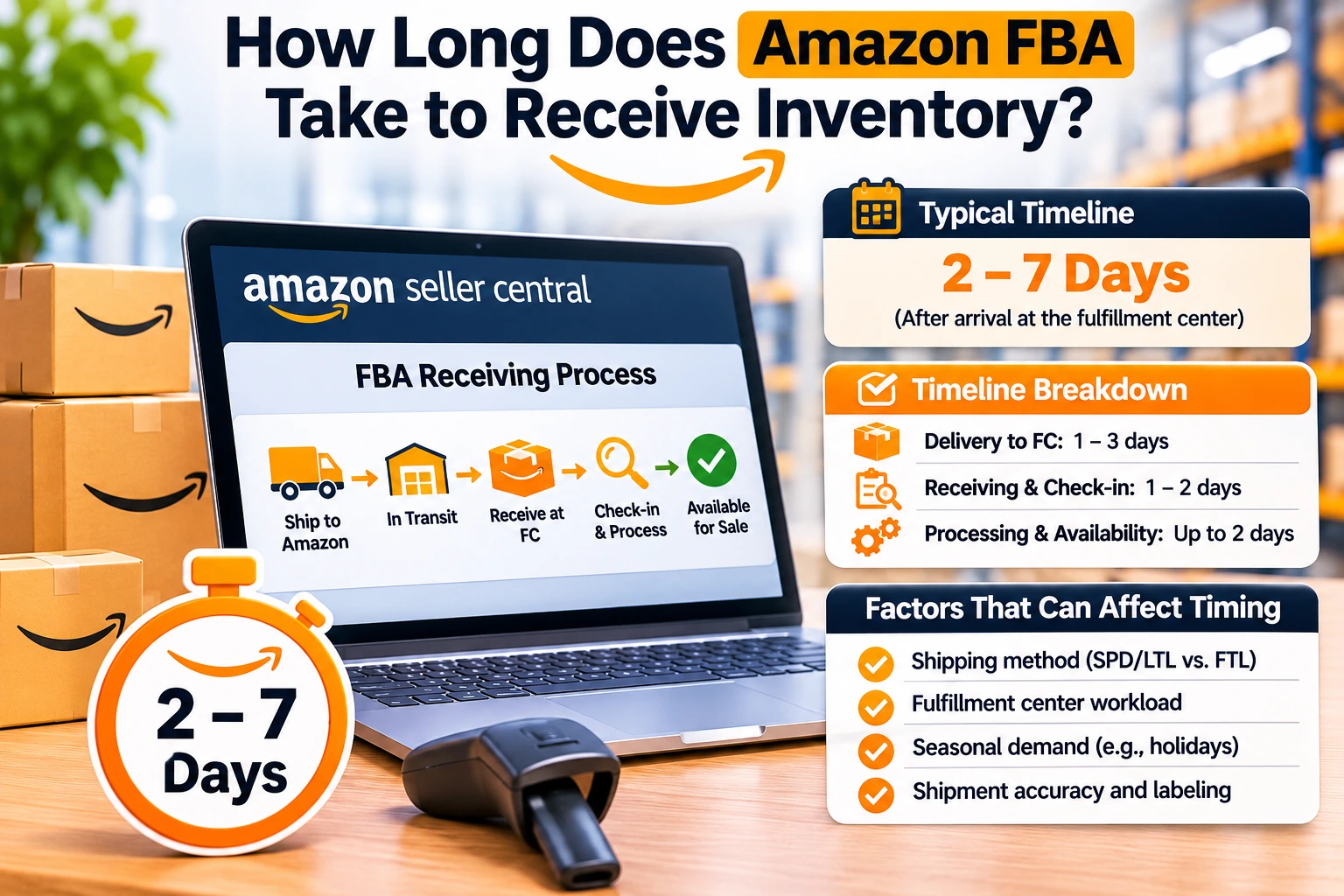
According to Amazon’s current US shipment tracking guidance, a shipment typically takes approximately two to five days to move from Delivered to Checked in, followed by up to one additional day to enter Receiving. Amazon also describes a typical period of six to fifteen days from receipt at the first facility until units become Prime eligible, although transfers and operational conditions can change those timings.
These are typical estimates, not guaranteed completion times. Amazon’s displayed estimated check-in date and the actual shipment events should take priority when evaluating a particular shipment.
Amazon FBA receiving time depends on the shipment’s delivery method, fulfillment center workload, packaging accuracy, product identification, internal transfers, and the distinction between physical receipt and sellable availability.
A shipment containing 300 units may start showing available stock before every unit has been processed. Another shipment may remain Checked in for several days because Amazon has not yet completed unloading and scanning.
For sellers, the challenge is not simply waiting for a shipment status to change. It is understanding how each stage affects inventory availability, sales forecasts, advertising budgets, and future replenishment decisions.
International sellers face additional complexity because manufacturing, inspection, freight, customs clearance, and local delivery must be coordinated before Amazon begins its receiving process.
This guide explains Amazon FBA receiving timelines in 2026, the meaning of each shipment status, why some shipments take longer than expected, how to investigate receiving delays, and how to plan inventory so that fulfillment processing does not unexpectedly disrupt sales.
How Long Does Amazon FBA Normally Take to Receive Inventory?
Amazon FBA inventory receiving is a sequence of operational events rather than one instant transaction. A carrier may confirm delivery to an Amazon facility while the shipment is still waiting for Amazon to check it in. After check-in, Amazon begins receiving the individual products, verifying shipment information, and assigning inventory to the appropriate fulfillment processes.
The total time varies by shipment and facility.
Amazon’s published US guidance currently estimates that the Delivered to Checked in stage typically takes two to five days. The next transition, Checked in to Receiving, typically takes up to one additional day.
These estimates describe parts of the inbound process, not a guaranteed total time until every unit becomes available for immediate delivery.
Amazon also explains that after units are received at the first facility, they may require additional transfers before becoming Prime eligible. Its current guidance describes a typical period of six to fifteen days for that stage.
The distinction is particularly important because received units can become available for purchase before they are positioned for immediate shipping.
For example, a shipment delivered on Monday might be checked in later that week. Amazon may then begin scanning units, allowing some inventory to become purchasable while the remaining units continue through receiving or fulfillment center distribution.
Another shipment might be delayed because the receiving facility is experiencing an unusually high inbound volume.
Neither example establishes a fixed timeline for every seller.
The most accurate estimate for a particular shipment is the information provided in its Seller Central shipment details, supported by carrier tracking and actual inventory movements.
Does Amazon Start Receiving Inventory Immediately After Delivery?
Not necessarily. The term Delivered can create confusion because it may reflect the carrier’s delivery information rather than completed physical intake by Amazon.
Amazon explains that a Delivered shipment may be waiting at the facility yard before its trailer or cartons are moved into the receiving workflow.
For example, an LTL shipment arriving on a busy day may wait before the fulfillment center can allocate a dock and unload the trailer.
A small-parcel shipment may also be delivered before every carton has been scanned.
During this period, Amazon may have received delivery information without having counted the individual sellable units.
A seller should not interpret the carrier’s proof of delivery as confirmation that Amazon has finished receiving the shipment.
Instead, review the shipment status and its estimated check-in information in Seller Central.
How Long Does Amazon FBA Check-In Take?
Amazon’s current US shipment guidance indicates a typical Delivered to Checked in period of two to five days.
Once a shipment enters Delivered status, Amazon may display an estimated check-in date based on the receiving facility’s current processing conditions.
The actual date can vary.
For example, a facility processing an unusually large number of inbound shipments may take longer than a facility operating under normal conditions.
Shipment preparation problems, missing tracking information, or trailer-related issues can also affect how accurately the delivery and check-in events are recorded.
A shipment that has not changed status after several days is not automatically lost.
The seller should compare its actual status with the estimate displayed in the account.
Amazon may also indicate longer processing when the facility is experiencing unusual delays.
How Long Does Checked In to Receiving Take?
The Checked in status means that the shipment has reached the appropriate stage for unloading and receiving, but the individual units have not necessarily been counted.
Amazon’s current US help guidance describes a typical transition of up to one additional day from Checked in to Receiving.
However, Amazon representatives have also explained that timing can differ according to shipment type, operational conditions, and peak periods.
Older forum guidance discusses longer examples for small-parcel and freight shipments.
Sellers should use the current shipment-specific estimate rather than relying on one historical forum post as a universal rule.
The key distinction is that Checked in does not mean the entire shipment has already been processed.
Receiving begins when Amazon starts scanning the relevant shipment information and units.
When Does Amazon FBA Inventory Become Available for Sale?
Amazon explains that received units can become available for sale as receiving progresses.
However, availability for purchase is not always identical to readiness for immediate shipment.
For example, Amazon may receive 100 units and make some available for customer orders while transferring stock to other locations.
The customer-facing delivery estimate may reflect these movements.
This means that a seller should monitor the actual available quantity and customer-facing offer, not only the overall shipment status.
If the shipment contains multiple SKUs, some products may become available earlier than others.
Likewise, a shipment may continue displaying Receiving while sales begin against units already processed.
An incomplete receiving status therefore does not necessarily mean that all inventory is unavailable.
How Long Until Amazon Inventory Becomes Prime Eligible?
Prime eligibility is associated with Amazon’s fulfillment readiness and applicable offering conditions.
Amazon’s current US guidance describes a typical six-to-fifteen-day period after receipt at the first facility for units to become Prime eligible.
However, that period may vary according to the number and length of transfers needed to position inventory within Amazon’s network.
For example, inventory may first be received at one facility before moving to a location closer to expected customer demand.
A product may be purchasable during this process but have a later delivery estimate.
Sellers should not promise immediate Prime delivery simply because the shipment has entered Receiving.
The customer-facing offer and Seller Central inventory information provide a better indication of actual availability.
What Do Amazon FBA Shipment Statuses Mean During Receiving?
Understanding the shipment status is essential because each stage represents a different point in the inventory journey.
Amazon’s Send to Amazon and shipment tracking tools allow sellers to follow inbound shipments from creation through delivery, receiving, and closure.
An incomplete or delayed status is not always a problem. The meaning depends on which activity Amazon is performing and whether the reported quantities match the shipment plan.
Shipment Created and Ready to Ship
The inbound process begins when a seller prepares a shipping plan through Send to Amazon.
The plan identifies the products, quantities, packaging configuration, and relevant shipment information.
At this stage, the products have not necessarily left the seller’s warehouse or supplier.
A shipment marked as created should not be interpreted as inventory already moving through Amazon’s fulfillment network.
The seller remains responsible for coordinating the carrier and ensuring that the correct products and quantities are shipped.
Incorrect information entered during shipment creation can create problems later when Amazon attempts to reconcile the received cartons and units.
Shipped and In Transit
Once the shipment has been handed to the carrier and properly dispatched, the shipment can move into a shipping or transit stage.
Carrier tracking becomes important during this period.
For international shipments, the process may also include port handling, customs clearance, local transportation, and delivery appointments.
These activities occur before Amazon completes its own receiving.
For example, a shipment leaving a manufacturer in China may require ocean freight, import clearance, and domestic trucking before reaching an Amazon fulfillment center.
The entire journey may take substantially longer than the Amazon receiving process itself.
Sellers should distinguish international transportation time from the internal receiving time they are trying to measure.
Delivered Does Not Mean Fully Received
Delivered generally indicates that Amazon has received carrier information showing the shipment is ready for delivery or has arrived at the relevant facility.
The shipment may still be waiting for check-in.
For example, a freight trailer may arrive at the fulfillment center yard and remain there until Amazon can move it to a dock.
The delivery event can therefore occur before any individual product unit is scanned.
This is why sellers sometimes see a confirmed carrier delivery date while the Amazon inventory balance remains unchanged.
The appropriate response is to review the current check-in estimate and confirm that the carrier and shipment information are accurate.
Checked In Means Receiving Has Not Yet Finished
The Checked in status indicates that Amazon has moved the shipment into the facility’s receiving workflow.
In Amazon’s documented shipment process, the trailer may have been moved to a dock and be ready for unloading.
However, Checked in inventory has not necessarily passed through individual unit receiving.
A seller should not assume that all cartons have been counted simply because the shipment reached this stage.
If the inventory remains Checked in longer than expected, the seller should review the latest shipment events and the estimate provided by Amazon.
Changing a product title or advertising campaign will not accelerate ordinary dock processing.
Receiving Means Amazon Is Scanning the Shipment
Receiving begins when Amazon starts scanning the shipment or relevant unit labels.
As units are processed, quantities may appear in the seller’s inventory records.
Some products may become available for sale before the entire shipment finishes receiving.
For example, a shipment containing 20 cartons may be processed in stages rather than all at once.
The inventory count may increase gradually as Amazon completes the relevant checks.
This can make the shipment appear partially received for several days.
Sellers should compare the shipped quantity with the received quantity while recognizing that the process may still be ongoing.
A partial receiving count is not automatically evidence of missing inventory.
Closed Does Not Always Mean Every Expected Unit Was Received
A shipment can reach Closed status when Amazon considers the receiving process complete under its applicable procedures.
This does not automatically prove that every expected unit was counted correctly.
If a discrepancy exists, sellers should review the shipment reconciliation information.
Amazon’s official guidance states that sellers can investigate receiving discrepancies through the relevant process once the shipment becomes eligible.
In some cases, the reconciliation eligibility date may be extended.
A seller should not assume that a delivery receipt or carton tracking number alone establishes the precise quantity of individual units received.
The appropriate evidence depends on the shipment and Amazon’s requirements.
Why Does Amazon FBA Inventory Take Longer to Receive?
Receiving delays can arise from several connected operational factors.
Some relate to the fulfillment center’s current workload, while others result from the shipment’s preparation, transportation, product information, or required handling.
A delay does not automatically indicate a mistake by the seller.
However, accurate preparation can reduce avoidable complications.
High Fulfillment Center Workload
Amazon processes inventory from many sellers and suppliers across its fulfillment network.
The volume of inbound shipments can vary by season, promotion, and local operational conditions.
For example, receiving facilities may experience increased activity before major shopping events or during seasonal inventory replenishment periods.
When demand for inbound processing is high, shipments may remain in the delivery or check-in queue longer than expected.
Amazon’s shipment guidance explicitly recognizes seasonality as a factor affecting processing time.
Sellers should therefore avoid treating a normal off-peak receiving experience as a guaranteed timeline for high-demand periods.
Inventory planning should include a realistic buffer rather than relying on the fastest previous shipment.
Incorrect Packaging and Labeling
Amazon requires shipments to follow applicable packaging, preparation, and labeling standards.
Problems involving carton labels, product barcodes, packaging configuration, or shipment identification can complicate receiving.
For example, a carton containing items that do not match the shipment plan may require additional investigation.
Products with missing or unreadable labels can also create handling difficulties.
Amazon’s shipment guidance warns that failure to follow packaging, preparation, and shipping requirements may delay receiving.
Before dispatching inventory, sellers should verify that the final cartons match the approved plan and applicable category requirements.
Professional Amazon FBA preparation and logistics coordination can support this process, but the shipment documentation and physical goods must remain accurate.
Differences Between Small-Parcel and Freight Shipments
Small-parcel deliveries and freight shipments enter Amazon’s network through different transportation and dock processes.
Small-parcel shipments may arrive as individual cartons.
LTL shipments involve less-than-truckload freight, while FTL shipments generally involve full-truckload transportation.
Each method has its own handling requirements.
For example, a freight shipment may need appointment coordination, trailer check-in, and unloading before receiving begins.
A small-parcel delivery may be processed through a different facility workflow.
Amazon representatives have explained that the transition to Receiving can vary according to shipping method.
However, these differences should not be used to assume that one shipping method is always faster.
The actual performance depends on the carrier, facility, shipment configuration, and current workload.
Product Identification and Barcode Problems
Every received unit must be associated with the correct product identity.
If the barcode or product identification does not match the expected listing, Amazon may require additional handling or investigation.
For example, a seller shipping a four-pack product using identifiers associated with a different package configuration may create a discrepancy.
Incorrect SKU assignments, mismatched FNSKU labels, or unexpected product variations can complicate inventory reconciliation.
The seller should verify that the correct product identifiers were used before shipment.
Product packaging, shipment plans, and catalog records should describe the same item.
Accurate identification also supports later inventory tracking and customer order fulfillment.
Shipment Quantity Differences
A receiving discrepancy occurs when the number of units Amazon reports receiving differs from the quantity the seller expected.
For example, a seller may ship 500 units while Seller Central initially records only 470.
This does not automatically mean that 30 units have been lost.
The shipment may still be undergoing receiving, or additional investigation may be required.
The seller should compare the shipment plan, packing records, carrier information, and Amazon’s receiving data.
If the shipment is still open, continue reviewing the current events and the reconciliation eligibility date.
Submitting premature or incomplete claims may not resolve the underlying question.
Internal Fulfillment Center Transfers
Amazon can move received inventory between facilities to support its fulfillment network.
These transfers may begin after the initial receiving event.
For example, a shipment may arrive at a receiving location, but the stock may ultimately be distributed to storage or fulfillment facilities serving different customer regions.
Amazon’s official guidance explains that these movements can affect the time required for units to become eligible for immediate shipping.
The seller may see some units categorized as reserved for fulfillment center transfer.
This does not automatically mean those units cannot be purchased.
The actual customer-facing availability depends on the transfer and the relevant offer conditions.
Sellers should distinguish the initial receiving process from subsequent fulfillment network movements.
Product Compliance or Catalog Restrictions
Some products are subject to additional listing or regulatory requirements.
A product may require accurate battery information, safety documentation, category approval, or other evidence.
If Amazon identifies a specific compliance issue, the seller should review the relevant notification and take the appropriate action.
However, not every receiving delay is caused by a compliance restriction.
A seller should not assume that inventory awaiting check-in is being held for a policy violation without evidence.
Check the listing status and Account Health information separately.
If Amazon has requested documents, provide genuine and relevant information.
Attempting to bypass an identified restriction through inaccurate listing changes can create more serious problems.
What Should Sellers Do When Amazon FBA Receiving Is Delayed?
A delayed shipment requires a structured investigation rather than immediate assumptions about lost inventory.
The goal is to identify where the shipment currently sits, whether Amazon’s estimated timeline has been exceeded, and whether the seller needs to provide additional information.
The first steps should focus on the available Seller Central records.
Review the Shipment Events Tab
Amazon’s shipment tracking guidance directs sellers to use the Shipment Events information within the relevant shipment details.
The events help identify when the shipment was dispatched, delivered, checked in, and entered receiving.
Open the shipment in Seller Central and review the latest available status.
Record the dates associated with each important event.
For example, a shipment might show delivery on November 10, check-in on November 13, and receiving beginning on November 14.
That history provides more useful information than simply stating that the shipment was dispatched two weeks earlier.
A seller should compare the current status with the estimate Amazon displays for that particular shipment.
Check the Estimated Check-In Date
Amazon may publish an estimated check-in date after a shipment enters Delivered status.
This estimate reflects current processing conditions at the relevant facility.
For example, a facility experiencing longer processing may display a later expected date.
The seller should review that estimate before escalating the issue.
Amazon’s current US guidance recommends contacting support when the shipment exceeds the updated estimated timeline by more than five business days.
That recommendation should be evaluated according to the exact account guidance and marketplace involved.
An estimate may change as Amazon receives more information about the shipment.
Sellers should preserve the current shipment details when requesting investigation.
Confirm Carrier Tracking and Delivery Evidence
A carrier’s delivery confirmation can help establish the transportation history.
For small-parcel shipments, verify the tracking numbers associated with the cartons.
For freight shipments, review the relevant delivery records and transportation documentation.
However, carrier delivery confirmation and Amazon’s individual unit receiving records are not interchangeable.
A signed delivery record may confirm that cartons or freight reached the facility without proving how many sellable units Amazon ultimately counted.
If a shipment is missing from the expected Seller Central status, check whether tracking information was entered correctly.
Amazon explains that missing tracking data or delays in communication between carriers and fulfillment centers can affect the visibility of shipment events.
Compare Shipped, Received, and Available Quantities
Inventory problems are easier to understand when the quantities are separated.
A seller may have shipped 1,000 units, Amazon may have received 800 so far, and only 500 may currently appear available.
These figures represent different operational concepts.
The 200-unit receiving difference may reflect work still underway, while some received inventory may be reserved or undergoing internal movement.
Review the shipment’s receiving information alongside the relevant FBA inventory reports.
If the shipment is still processing, monitor whether the received quantity changes over time.
If Amazon has closed the shipment and a discrepancy remains, review the applicable reconciliation procedure.
Do not confuse temporary reserved inventory with a confirmed receiving shortage.
Investigate Incomplete Receiving After Shipment Closure
Amazon provides a shipment reconciliation process for eligible discrepancies.
The seller should verify that the shipment has reached the appropriate status and that the investigation eligibility date has arrived.
Amazon’s documentation explains that reconciliation dates may be extended in certain circumstances.
For example, a shipment may have been closed with fewer units recorded than the seller expected.
The seller should gather relevant packing information, invoices, carrier records, and other evidence requested by Amazon.
A support case should describe the discrepancy accurately and identify the affected shipment and SKU.
The reimbursement or correction outcome depends on Amazon’s investigation and applicable policies.
There is no guarantee that every reported difference will qualify for reimbursement.
Prepare a Focused Seller Support Request
If the shipment exceeds the relevant estimated timeline or displays an unresolved abnormal status, contact Amazon Selling Partner Support through Seller Central.
Include the shipment ID, marketplace, fulfillment center where available, carrier information, tracking details, important event dates, and affected SKUs.
Explain the specific problem.
For example, a seller might state that the carrier confirmed delivery, the Amazon check-in estimate has passed, and the shipment has not entered Receiving.
Another case might concern a shipment that entered Receiving but still has a large unresolved quantity discrepancy.
These require different investigations.
Avoid submitting unrelated account health complaints or duplicate cases with inconsistent explanations.
The purpose is to give Amazon enough information to identify the appropriate operational issue.
Can Amazon Seller Support Speed Up Receiving?
Sellers often ask whether Amazon can manually accelerate receiving after a delay.
Amazon representatives have stated that Seller Support generally cannot manually expedite the normal receiving process or change certain shipment statuses.
A support case may help clarify a discrepancy or investigate unusual delays, but it should not be treated as a guaranteed method for moving inventory ahead of other shipments.
For example, a seller preparing a product launch cannot assume that explaining the upcoming advertising campaign will result in immediate receiving.
The best approach is to manage the issue through the supported shipment process while adjusting commercial plans according to actual inventory availability.
This is particularly important for businesses with limited launch stock or time-sensitive promotions.
How Can Sellers Reduce Amazon FBA Receiving Delays and Plan Better Shipments?
Amazon controls its internal receiving operations, but sellers can reduce avoidable risks through accurate shipment preparation and realistic supply chain planning.
The objective should not be to assume every shipment will arrive and become available within the shortest published estimate.
Instead, businesses should use actual historical performance, product requirements, and current Amazon guidance to create a more dependable replenishment process.
Prepare Accurate Shipment Plans
A shipment plan should reflect the products and quantities that will actually be delivered.
Before confirming the shipment, verify the SKUs, ASINs, carton quantities, packaging configuration, and relevant preparation requirements.
For example, a private label seller shipping multiple variations should ensure that cartons containing different products are identified correctly.
Incorrect quantities or product assignments can complicate receiving and reconciliation.
If a supplier prepares the cartons, provide written packing instructions and request final confirmation before dispatch.
This helps reduce the risk of shipment information differing from the physical goods.
Follow Amazon Packaging and Labeling Requirements
Amazon’s requirements may vary according to product category, shipping method, and marketplace.
A seller should use the current guidance displayed in Seller Central rather than relying on outdated packaging instructions.
Ensure that product barcodes and shipment labels are accurate and readable.
Check whether the product requires special preparation or safety documentation.
For example, fragile products may require suitable protective packaging, while products with batteries may have additional handling considerations.
Incorrect packaging does not automatically mean a shipment will be rejected, but it can create delays or additional handling requirements.
Quality checks before shipping are generally easier to organize than corrections after inventory reaches a fulfillment center.
Build Receiving Time Into Replenishment Forecasts
Inventory forecasting should include more than supplier production and transportation.
It should account for the time needed for Amazon to receive and make stock available.
A simplified model is:
Total Replenishment Lead Time = Supplier Production + Transportation + Customs and Local Delivery + Expected Amazon Receiving and Availability Buffer.
For example, assume a product requires 20 days for production, 25 days for international transportation, five days for final delivery activities, and ten days as an illustrative receiving and availability allowance.
The total planning lead time would be 60 days.
This is a hypothetical example, not an Amazon receiving guarantee.
A business selling ten units daily would need to consider approximately 600 units of demand during that period before adding any additional safety stock.
Actual planning should use measured lead times and account for uncertainty.
Monitor Historical Receiving Performance
Businesses with repeated FBA shipments can track how long inventory takes to move through each stage.
Record the shipment creation date, carrier delivery date, Amazon check-in date, first receiving date, and date relevant quantities became available.
For example, a seller may discover that its average receiving experience differs according to shipping method or destination facility.
However, historical patterns do not prove that future shipments will follow the same timeline.
Amazon’s internal allocation and facility workload can change.
Use historical performance as a planning input rather than a promise.
A rolling analysis can help sellers establish more realistic inventory buffers and identify unusual shipment delays.
Avoid Waiting Until Inventory Is Almost Empty
Reordering too late can expose a business to stockouts when manufacturing, transportation, or receiving takes longer than expected.
A seller should establish a reorder point based on demand and replenishment lead time.
Reorder Point = Average Daily Sales × Replenishment Lead Time + Safety Stock.
For example, a product selling seven units per day with a total replenishment lead time of 50 days and 100 safety units has an illustrative reorder point of 450 units.
Actual requirements may be higher or lower depending on demand uncertainty, expected growth, and stock already on order.
The important principle is that inventory should be replenished before the entire supply chain buffer has been consumed.
A shipment being Delivered does not mean the business can safely count every unit as immediately available.
Coordinate Freight, Customs, and FBA Delivery
International sellers should establish clear responsibilities between manufacturers, freight forwarders, customs brokers, warehouses, and Amazon.
Each party controls a different stage of the shipment journey.
For example, a freight forwarder may confirm that the cargo reached the destination country, but this does not prove that Amazon has received the inventory.
A customs clearance confirmation does not establish that the cartons have reached the fulfillment center.
Similarly, the carrier’s proof of delivery does not mean every unit has become sellable.
These distinctions should be reflected in the seller’s logistics reporting.
Professional product sourcing and supplier coordination can help reduce preparation errors before goods leave the manufacturer.
Businesses should still verify the actual terms and responsibilities of each provider.
Coordinate Advertising With Inventory Availability
A successful launch requires more than sending inventory to Amazon.
The product listing, images, pricing, advertising campaigns, and available stock should be ready at the same time.
For example, a seller might plan a Sponsored Products campaign to begin immediately after the expected delivery date.
If the shipment is still Checked in, the campaign may not have the intended product availability.
Sellers should review the offer’s actual purchasability before committing to significant advertising expenditure.
For products already generating sales, low inventory coverage may justify closer coordination between replenishment decisions and advertising strategy.
However, any bid or budget changes should reflect the business’s broader objectives.
Amazon PPC cannot replace the need for available inventory.
Use Warehousing to Improve Inventory Flexibility
Some businesses choose to keep additional stock in external warehouses rather than send their entire supply immediately to FBA.
This can provide flexibility when replenishment demand is uncertain.
Depending on marketplace availability, Amazon Warehousing and Distribution or third-party logistics providers may form part of the storage strategy.
For example, a brand may keep reserve cartons at a 3PL and replenish FBA periodically.
However, additional storage locations can create separate fees and transportation costs.
The choice should reflect product economics, sales velocity, delivery requirements, and cash flow.
The goal is not simply to move inventory between warehouses but to create a supply chain that can support consistent sales without excessive stock commitments.
How Can iNNOVEX Enterprises Help With Amazon FBA Receiving and Inventory Management?
Amazon FBA receiving delays become more manageable when businesses understand the shipment process and maintain accurate inventory planning.
The real operational challenge is coordinating production, freight, receiving, stock availability, and marketplace sales rather than treating each stage as an unrelated activity.
At iNNOVEX Enterprises, an Amazon SPN agency, we support sellers with Amazon FBA setup, shipment preparation coordination, inventory management, warehousing, and marketplace operations.
Our services help businesses organize the information and workflows required to send products into Amazon’s fulfillment network.
For sellers experiencing unexpected receiving delays, the starting point is to review the shipment status, carrier delivery information, received quantities, and Amazon’s current processing estimates.
A shipment waiting for check-in requires a different approach from a shipment with a closed receiving discrepancy.
Understanding that distinction helps avoid unnecessary listing changes or premature investigations.
Amazon FBA Setup and Shipment Coordination
We support relevant FBA setup and shipment planning activities, including coordination of product details, carton information, and preparation requirements.
For businesses launching new products, this can help align supplier packaging with the applicable Amazon shipment workflow.
Accurate preparation supports a more organized transition from manufacturing to fulfillment.
However, Amazon determines the final receiving and processing schedule.
No service provider can guarantee immediate check-in or preferential fulfillment center treatment.
Amazon Inventory Management and Replenishment Planning
Our account management and inventory services support businesses in reviewing available stock, inbound shipments, and expected replenishment requirements.
For established sellers, this information can help identify potential stockouts before inventory reaches critically low levels.
For new sellers, inventory planning can help balance the cost of a large initial shipment against the risk of insufficient launch stock.
The appropriate strategy depends on actual demand, product margins, supplier lead times, and available working capital.
Amazon Warehousing and International Logistics
International Amazon sellers may need to coordinate several parties before inventory reaches its destination fulfillment center.
We support relevant logistics and warehousing workflows, including coordination associated with supplier preparation, freight, customs clearance, and FBA delivery.
For example, a business shipping products from an overseas manufacturer may require clear documentation at each transportation stage.
Accurate records can help establish whether a delay occurred before delivery to Amazon or during Amazon’s internal receiving process.
Legal customs and import responsibilities must remain with the appropriate authorized parties.
Amazon Listing and Account Management
Receiving inventory is only one part of maintaining a functional Amazon business.
A product also needs an eligible listing, accurate catalog information, appropriate pricing, and a purchasable offer.
Our Amazon listing and account management services help sellers coordinate these related activities.
For example, a business may have fully received inventory but still be unable to generate sales because of a separate listing restriction.
Distinguishing catalog eligibility from inventory receiving is essential.
We support appropriate troubleshooting workflows while Amazon retains control over its listing and fulfillment decisions.
Frequently Asked Questions About Amazon FBA Receiving Time
How many days does Amazon FBA take to receive inventory?
Amazon’s current US guidance describes a typical two-to-five-day period from Delivered to Checked in, followed by up to one additional day to enter Receiving. Actual processing varies by shipment and facility.
Why is my Amazon shipment delivered but not receiving?
The shipment may have reached the facility without completing check-in. The carrier’s delivery confirmation does not mean Amazon has already scanned the individual units.
How long does Amazon FBA take to check in a shipment?
Amazon currently provides a typical US check-in estimate of two to five days after delivery. Sellers should follow the updated estimate shown for their particular shipment.
Why is my Amazon shipment stuck in Checked in status?
Amazon may still be unloading, preparing, or processing the shipment at the dock. The transition to Receiving can vary according to operational workload and shipment conditions.
Can products become available before the whole FBA shipment is received?
Yes. Amazon explains that units can become available for sale as they are received, even while other units from the shipment continue through processing.
How long until FBA inventory becomes Prime eligible?
Amazon’s current US guidance describes a typical period of six to fifteen days after receipt at the first facility, although internal transfers and other conditions can affect the result.
Does Amazon FBA receiving take longer during peak seasons?
It can. Amazon identifies seasonality and facility processing conditions as factors affecting receiving timelines. Sellers should use current shipment estimates and maintain realistic replenishment buffers.
Why does Amazon show fewer received units than I shipped?
The shipment may still be processing, or there may be a genuine quantity discrepancy. Review the shipment status and reconciliation eligibility before drawing conclusions.
Can Amazon Seller Support speed up receiving?
Amazon representatives have stated that normal receiving generally cannot be manually expedited. Support may assist with investigations or clarification when a shipment exceeds the relevant expected timeline.
What should I do if my FBA shipment is taking too long?
Review the shipment events, estimated check-in date, tracking information, received quantities, and applicable investigation requirements. Contact Seller Support with the specific shipment information when the relevant threshold or eligibility conditions are met.
Conclusion: Plan for Inventory Availability, Not Just Warehouse Delivery
Amazon FBA receiving time is not measured only by the number of days between carrier delivery and the first inventory update.
A shipment moves through several stages, including delivery, check-in, receiving, and potentially additional fulfillment center transfers.
Amazon’s US guidance provides useful typical estimates, but actual timelines vary according to facility conditions, shipping methods, preparation accuracy, and internal distribution requirements.
For sellers, the most important distinction is between a product reaching Amazon’s facility and that product becoming available for customers to purchase or receive quickly.
When a shipment appears delayed, review the specific shipment events before assuming that inventory has been lost.
Compare carrier tracking, Amazon check-in estimates, received quantities, and available inventory.
If the issue falls outside the expected process, use the appropriate Seller Central support or reconciliation workflow.
Long-term performance depends on better inventory planning.
Sellers should include realistic receiving and availability buffers in replenishment forecasts, maintain accurate shipment records, and coordinate advertising with available stock.
As an Amazon SPN agency, iNNOVEX Enterprises supports businesses with FBA setup, inventory management, warehousing, logistics coordination, product listings, and account operations across UAE, USA, UK, Saudi Arabia, and other marketplaces.
If your Amazon shipment has reached the fulfillment center but inventory remains unavailable, begin by reviewing the latest shipment events and identifying which stage is causing the delay.
For professional Amazon FBA and inventory management support, visit iNNOVEX Enterprises to discuss your fulfillment and replenishment requirements.